

ChromeDebug MCP Assistant

Overview
Record what your browser did - frames, clicks and console logs - for your AI assistant via MCP. 25 free recordings, optional PRO.
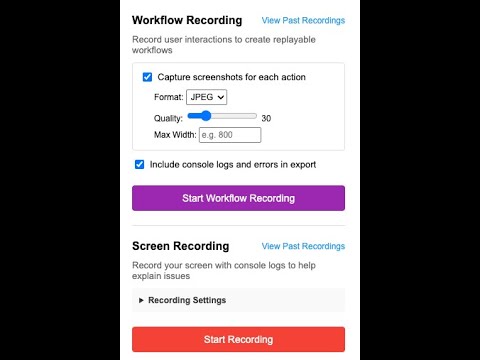
🌙 IT'S 2AM AND THE BUG WON'T REPRODUCE You clicked something, the console went red, the page recovered, and now you can't make it happen again. All you can give your AI assistant is a description of what you think you saw. ChromeDebug records what actually happened — the frames, the clicks, the console output, in order — and hands it to your AI assistant through MCP. Instead of describing the bug, you hand over the recording. 🎬 FOUR RECORDING MODES, PLUS QUICK CAPTURE 🧭 Workflow Recording — records your interactions as a replayable workflow, with optional per-action screenshots (JPEG or PNG, quality slider, max width) and console logs. 🎥 Screen Recording — interval frames with console logs attached. One frame every 0.5s, 1s, 2s, 3s or 5s, at 10–70% JPEG quality, with an optional capture flash and optional mouse tracking. 📹 Video Recording — the same capture tuned for smooth playback, with cursor movement and clicks drawn over the frames. 📸 Screenshot Recording — click-to-capture with an Instant / 3s / 5s countdown and an option to hide the cursor. This is the one for dropdowns, modals and tooltips that vanish the moment you look away. 📷 Capture menu — Current View, Full Page or Select Section, on demand, copyable straight to the clipboard. Every recording mode is on the free tier. None of them is locked behind a purchase. 🧩 THE COMPANION SERVER — WHAT NEEDS IT, WHAT DOESN'T npm install -g @dynamicu/chromedebug-mcp chromedebug-mcp-server Then point Claude Code, or any MCP-compatible assistant, at it. Without the server the extension is not inert. It shows a "Browser-only mode" banner, and Screen Recording, Video Recording and the Capture menu keep working and fall back to browser storage, staying playable (newest 50 captures kept). Browser-stored recordings can be lost when you clear browsing data. Two modes require the server and will not start without it: Workflow Recording and Screenshot Recording. Both show "Server not running" until you start it. The server is also what your AI assistant talks to. 🔐 YOUR RECORDINGS STAY ON YOUR MACHINE No account. No login. No analytics, telemetry or crash reporting anywhere in the build. Recordings live in your browser or in the companion server's database on localhost. ChromeDebug never uploads a recording. When you ask your AI assistant to read one, your assistant sends what it reads to whatever model you use — that hop is yours, not ours. At most one request ever leaves your machine — a one-time licence check with Lemon Squeezy when you activate PRO, and not even that if your key is already in this build's offline list. It carries the key: no email, no machine ID, no browsing or usage data (Lemon Squeezy sees the request's IP address, as any web request does). Links you click — checkout, your Lemon Squeezy orders, the privacy policy — open in a normal tab. Everything else the extension talks to is localhost. ChromeDebug does not inject itself automatically on a short built-in list of popular video, search, mail and social sites. That exclusion covers those sites themselves and not their subdomains, and it does not stop you recording them: start a recording on one of those tabs deliberately and it is injected for that recording. 💚 FREE — 25 RECORDINGS • 25 recordings total, a one-time allowance, not a daily one • The 25 are shared across every browser signed into your Google account — not 25 per machine • Every capture costs one: a quick screenshot spends the same as a full recording • A Workflow or Screenshot recording that captured nothing doesn't cost you one — in those two modes the counter moves only after something was actually recorded • All four modes, the Capture menu, console log capture, workflow export as JSON, single image download, copy to clipboard • Images carry a small "ChromeDebug FREE" badge in the corner • ZIP and MP4 export are PRO — on free, those buttons open the upgrade panel If licence status can't be read for any reason, you aren't blocked and the recording isn't counted. The code deliberately errs in your favour. ⭐ PRO — $29.99, ONE TIME • Unlimited recordings — the counter is never read again • MP4 export — H.264 muxed in the browser with WebCodecs, nothing uploaded (Chrome 94+) • ZIP export — a metadata JSON, a README, and every screenshot as a separate image • No badge on screenshots, clipboard copies, full-size viewing or video playback Badges are applied when an image is shown, never when it's stored — so recordings made during the trial come back clean the moment PRO is active. Nothing needs re-recording. 🔑 HOW PRO UNLOCKS One extension. PRO already ships inside it, dormant. Buy through Lemon Squeezy (sold by the developer, not through Google), then open the popup → Upgrade to PRO → "I have a licence key", and paste it. Nothing to download, nothing to reinstall. Your key is checked once, unless it is already in this version's built-in list, in which case it is never checked online at all. After unlocking, PRO never checks online again — it works offline and does not expire. It travels through Chrome sync to other profiles on the same Google account, and you can remove it from one browser without affecting the others. One caveat worth knowing up front: PRO applies in your own Chrome profile. Chrome windows the MCP server launches use a temporary profile, so those stay on the free trial. 🛠️ PERMISSIONS, AND WHY activeTab, scripting, tabs — read and instrument the page you're recording, and capture its console output through an injected console interceptor tabCapture, offscreen — capture frames and video storage, unlimitedStorage — keep recordings and settings locally debugger — full-page and section screenshots, captured through the DevTools protocol, attached only for the capture and detached immediately. Chrome shows a "started debugging this browser" bar while a capture runs notifications — tell you when a recording finishes sidePanel — the recording UI No host_permissions entry — but the content script matches all sites, so Chrome asks for access to all websites at install. It runs only to instrument the page you are recording; nothing is sent anywhere but your own machine. 📮 SUPPORT ChromeDebug is an independent product, not affiliated with or endorsed by Google or Anthropic. Chrome is a trademark of Google LLC. Questions and refunds: support@dynamicupgrade.com Privacy policy: https://www.dynamicupgrade.com/chromedebug/privacy
0 out of 5No ratings
Details
- Version2.9.4
- UpdatedOctober 10, 2026
- Offered bydynamicupgrade
- Size397KiB
- LanguagesEnglish
- DeveloperDynamic Upgrade LLC
2840 E Germann Rd Chandler, AZ 85286-1400 USEmail
dynamicupgrade@gmail.comPhone
+1 702-530-9833 - TraderThis developer has identified itself as a trader per the definition from the European Union and committed to only offer products or services that comply with EU laws.
- D-U-N-S119471095
Privacy

This developer declares that your data is
- Not being sold to third parties, outside of the approved use cases
- Not being used or transferred for purposes that are unrelated to the item's core functionality
- Not being used or transferred to determine creditworthiness or for lending purposes