

LeetGit
1 rating
)
Overview
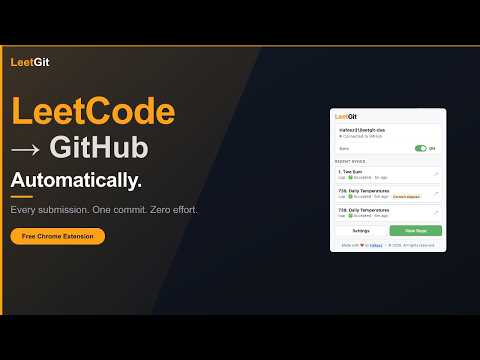
Automatically sync LeetCode submissions to GitHub. One solve, one commit — build your coding portfolio effortlessly.
LeetGit automatically syncs your LeetCode submissions to GitHub the moment you hit Submit. No copy-paste, no manual uploads, no effort. Every problem you solve becomes a structured Markdown file committed to your GitHub repository, complete with difficulty, topic tags, runtime percentile, memory percentile, your LeetCode notes, and a full history table that tracks every attempt you've made on that problem. Over time, your GitHub becomes a permanent, browsable archive of your entire coding journey. Whether you're grinding for interviews, building a portfolio, or just want your progress saved somewhere meaningful. LeetGit does it silently in the background so you can stay focused on solving. 🚀 WHY LEETGIT? Most developers solve hundreds of LeetCode problems and have nothing to show for it. LeetGit fixes that. Every accepted solution and every attempt if you choose, lands in your GitHub with a clean commit, a rich Markdown file, and a growing history table per problem. Your GitHub activity graph fills up. Your repo becomes proof of work. ✨ FEATURES • Automatic capture: Intercepts your submission the moment you hit Submit. Works with Accepted, Wrong Answer, Time Limit Exceeded, Runtime Error, and more. • Rich Markdown files: Each solution file includes the problem title, difficulty, language, topic tags, runtime percentile, memory percentile, your LeetCode notes, and a code block with your solution. • Per-problem history table: Every attempt on the same problem is tracked in a history table inside the file, so you can see how you improved over time. • Smart duplicate detection: If you resubmit the exact same code and notes, LeetGit skips the commit automatically. No noise in your repo. • Pause / resume syncing: Toggle syncing on or off from the popup or the floating panel on LeetCode. Submissions while paused are silently discarded. • Hide problem difficulty: Opt-in focus mode that masks the Easy / Medium / Hard badge so you attempt problems blind. Click the badge to temporarily peek — it re-masks automatically when you navigate to a new problem. • Custom commit messages: Use a template with variables like {number}, {title}, {language}, {status}, and {difficulty} — or enable "Ask me every time" mode to type a custom message before each commit. • Sync filtering: Choose exactly which outcomes trigger a commit. Accepted only, or include Wrong Answer, TLE, and others. You decide. • Keyboard shortcut (Alt+Shift+L or custom shortcut): Open the panel instantly without touching your mouse. Stay in your flow. • Subfolder support: Organise solutions the way YOU want. Switch between easy/, contest/, blind75/ right from the panel. Your last choice is always remembered. • Token expiry warning: LeetGit surfaces a warning in the popup before your GitHub token expires, so you're never caught off guard mid-grind. • Skip a commit: Not every submission needs to be committed. Now you can skip one without losing your flow. • Settings backup: Export your full configuration to a JSON file, import it on another machine, or wipe everything cleanly at any time. ⚡ HOW TO SET UP (takes under 2 minutes) Step 1: Create or pick a GitHub repository Use an existing repo or create a new one. We recommend naming it leetcode-solutions to keep things clean. Step 2: Generate a GitHub Personal Access Token Go to github.com/settings/personal-access-tokens and create a fine-grained token scoped to your target repository. You only need one permission: Contents → Read and Write. Copy the token. Step 3: Connect LeetGit Click the LeetGit icon in your Chrome toolbar → paste your token → click Load repos → select your repository and branch → click Save & finish. That's it. LeetGit is now live. 🎯 HOW IT WORKS DAY TO DAY → Open any problem on leetcode.com and write your solution as normal. → Hit Submit. LeetGit captures the result automatically. → A floating panel appears in the bottom-right corner showing the sync status. → Within seconds, a commit lands in your GitHub repository. → Click the ↗ button in the popup or the panel to jump directly to the committed file on GitHub. To check recent activity, click the LeetGit icon in your toolbar. The popup shows your last 3 synced submissions with language, result, time, and a direct link to the GitHub file. To pause syncing temporarily, toggle the ON/OFF switch in the popup or the floating panel. Toggle it back when you're ready to resume. 🔒 PRIVACY & PERMISSIONS — 100% Safe LeetGit only reads from leetcode.com and writes to api.github.com on your behalf. It does not collect, transmit, or store any data outside your own browser and your own GitHub repository. Your GitHub token is stored locally in Chrome's extension storage and is never sent anywhere except directly to the GitHub API. The extension requires: • Access to leetcode.com/problems/* — to intercept submission results • Access to api.github.com/* — to commit files to your repository • Storage — to save your settings and recent sync history locally • Notifications — to alert you if a sync fails (optional, can be disabled in Settings) 📋 SETTINGS REFERENCE Token: Fine-grained GitHub PAT with Contents read & write on your target repo Repository: The GitHub repo where solutions are committed Branch: Branch to commit to (defaults to main) Subfolder: Optional path prefix inside the repo (e.g. solutions) Sync outcomes: Which submission statuses trigger a commit Skip duplicates: Skip a commit when code and notes are unchanged (on by default) Commit message mode: Auto-template or prompt you each time Commit message template: Default: Solve {number}. {title} ({language}) Glow on success: Floating button pulses green after a successful commit Notify on failure: Browser notification if a sync fails so nothing is silently lost Built for developers who want their LeetCode grind to count for something beyond the platform itself. Start building your GitHub archive today.
5 out of 51 rating
Details
- Version1.2.0
- UpdatedJuly 1, 2026
- Offered byHafeez Mohamad
- Size2.21MiB
- LanguagesEnglish
- Developer
Email
haffeecareer@gmail.com - Non-traderThis developer has not identified itself as a trader. For consumers in the European Union, please note that consumer rights do not apply to contracts between you and this developer.
Privacy

This developer declares that your data is
- Not being sold to third parties, outside of the approved use cases
- Not being used or transferred for purposes that are unrelated to the item's core functionality
- Not being used or transferred to determine creditworthiness or for lending purposes