

LectureCatchUp
1 rating
)
Overview
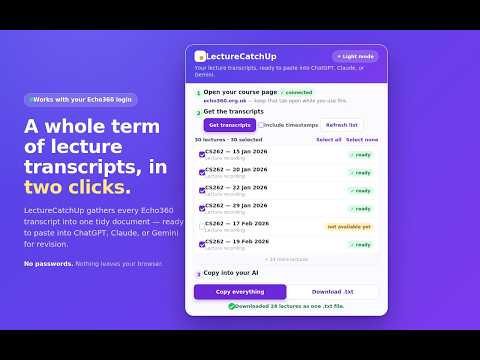
Collects your Echo360 or Panopto lecture transcripts into one document, ready to paste into ChatGPT, Claude, or Gemini.
LectureCatchUp gathers the transcripts from your university lecture recordings into one tidy document, ready to paste into the AI assistant you use for revision. Instead of opening each recording, finding the transcript panel and downloading files one at a time, you can collect a whole module in a couple of clicks. The combined document labels every lecture with its date and title, so it's easy to ask for summaries, flashcards or practice questions. HOW IT WORKS 1. Log in to your university's lecture-capture site (Echo360 or Panopto) as normal and open your course page. 2. Click LectureCatchUp and pick the lectures you want, or select all. 3. Click "Copy everything" to put the combined document on your clipboard, or save it as a single text file. 4. Paste it into your AI assistant (for example ChatGPT, Claude or Gemini) and start revising. FEATURES - Collect a whole term of transcripts at once, clearly labelled by lecture. - Copy to clipboard or download as one text file. - Optional timestamps, light and dark mode. - Works with your existing login. No account, no setup. PRIVACY Everything happens in your browser. No servers, no tracking, no ads, and nothing is sent anywhere except the requests to your own institution's lecture-capture service to fetch the transcripts you choose. Downloaded transcripts are for your own personal study, in line with your institution's recording-use policy.
5 out of 51 rating
Details
- Version2.0.0
- UpdatedJune 15, 2026
- Size30.84KiB
- LanguagesEnglish
- Developer
Email
varshnay.sinha@gmail.com - Non-traderThis developer has not identified itself as a trader. For consumers in the European Union, please note that consumer rights do not apply to contracts between you and this developer.
Privacy

This developer declares that your data is
- Not being sold to third parties, outside of the approved use cases
- Not being used or transferred for purposes that are unrelated to the item's core functionality
- Not being used or transferred to determine creditworthiness or for lending purposes