

LeaveSpace — Website Blocker

Overview
Block unlimited distracting sites for free, with schedules, a daily time limit for one site, password lock and local data.
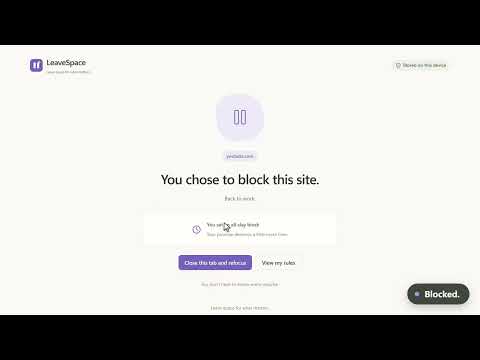
Leave space for what matters. LeaveSpace blocks the sites that pull you away: less mindless browsing, more time for yourself. Core features are free, and no account is needed. ■ Free features • No plan-based website limit. Subdomains are included automatically. • Always block, or block on a schedule by day and time. • Daily limit on 1 website: Give it a daily allowance, such as 20 minutes. The focused tab and tabs playing sound count; muted or silent background tabs never do. When the time is used up, the site is blocked until midnight, local time. • Choose what happens on a blocked visit: show the block page, or go to an address you pick, such as your to-do list. If that address is restricted too, the block page is shown instead. • Write your own block page message in plain text, up to 120 characters. • Password protection: Require a password to edit, pause or delete rules. Someone you trust can set it for you. • Local usage summaries: Daily totals stay on this device for 30 days. Switching apps, locking the screen or closing the browser stops tracking. Long sleep gaps are excluded. Totals count one foreground tab; daily limits also count tabs playing sound. • Rule backups: Backups exclude passwords and usage. Import replaces your rules but keeps the password and recorded usage. Password verification applies when enabled. ■ LeaveSpace Pro (in preparation) • Daily limits on more sites are coming with LeaveSpace Pro — a one-time purchase, no subscription. The free version stays fully usable on its own. • Planned one-time purchase; price to be announced. Planned purchase covers the local Pro features listed here. No subscription. It does not promise every future feature, online service or lifetime updates. • No checkout or activation is connected. No payment is collected. ■ Privacy • No account, ads or uploads. Rules, usage and password hashes stay in this Chrome profile. Uninstalling removes them. • To match rules, the extension reads tab URLs, navigation events and whether a tab is playing sound or muted while running, extracting only domains. It does not read page text, form entries, cookies or the browser history list. A content script sends visibility signals for timing without reading page contents. • Counts of Pro entry views, Pro page opens and prompts shown when you add a daily limit to another website are kept only on this device, with the date of the last prompt so it appears at most once a day. They contain no websites, emails or identifiers, are not uploaded, and cannot be aggregated by the developer. Uninstalling deletes them. • Timer log: when a daily limit starts or stops counting, the time, domain and cause (such as focus, sound or idle) are recorded, without full addresses or page contents. It is kept on this device for 24 hours, is not uploaded or included in backups, and you can copy it yourself from settings. ■ Good to know This is a habit-management tool. The password does not prevent disabling or uninstalling the extension, using another browser or changing local files. Timing depends on browser scheduling and may be delayed, especially during sleep or heavy load. Incognito use requires separate permission in Chrome. Languages: English · 简体中文 · 繁體中文 · 日本語 · 한국어 · Deutsch · Français · Español · Português (Brasil) Support: leavespace.support@gmail.com
0 out of 5No ratings
Details
- Version1.6.0
- UpdatedNovember 11, 2026
- Offered byleavespace.support@gmail.com
- Size247KiB
- Languages9 languages
- DeveloperLIHAO
珠江路60号 青岛市, 山东省 266400 CNEmail
leavespace.support@gmail.comPhone
+86 155 5402 2162 - TraderThis developer has identified itself as a trader per the definition from the European Union and committed to only offer products or services that comply with EU laws.
Privacy

LeaveSpace — Website Blocker has disclosed the following information regarding the collection and usage of your data. More detailed information can be found in the developer's privacy policy.
LeaveSpace — Website Blocker handles the following:
This developer declares that your data is
- Not being sold to third parties, outside of the approved use cases
- Not being used or transferred for purposes that are unrelated to the item's core functionality
- Not being used or transferred to determine creditworthiness or for lending purposes
Support
For help with questions, suggestions, or problems, visit the developer's support site