


Overview
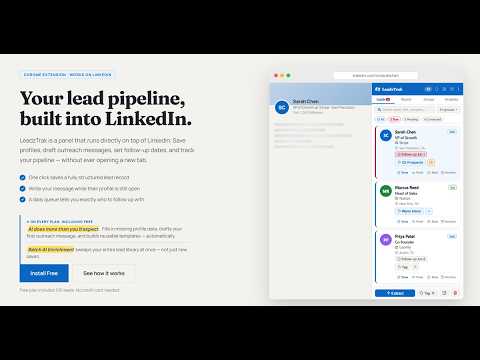
LeadzTrak for LinkedIn: capture, organize, and follow up on leads from a docked side panel.
Stop Copy-Pasting LinkedIn Leads Into Spreadsheets ====================================================================== You found the perfect prospect on LinkedIn. You copy their name. Paste it into a spreadsheet. Copy their title. Paste again. Copy the company. Paste. Switch tabs. Lose your place. Forget to follow up. Sound familiar? LeadzTrak is the LinkedIn lead generation tool that ends the copy-paste chaos. A single floating panel on LinkedIn that lets you capture, enrich, organize, sync, and export leads — all without leaving the page. Think of it as your LinkedIn CRM, LinkedIn lead extractor, and prospect management tool rolled into one lightweight extension. WHAT LEADZTRAK DOES FOR YOU ====================================================================== FIND EMAILS, PHONES & WEBSITES (CONTACT INFO FINDER) ---------------------------------------------------- One click pulls a lead's contact info — email addresses, phone numbers, and websites — straight from their LinkedIn profile via LinkedIn's own data, with a safe in-app view when needed. No sketchy third-party scrapers, no leaving LinkedIn. The LinkedIn email finder recruiters and sales teams actually use. ONE-CLICK LEAD CAPTURE ---------------------- Click "Extract" on any LinkedIn search results page and every visible profile is captured instantly — name, title, company, location, photo, connection degree. The fastest LinkedIn profile extractor and LinkedIn lead scraper you'll ever use. No typing. No copy-paste. No switching tabs. LIVE CONNECTION STATUS TRACKING ------------------------------- Know exactly where you stand with every lead. LeadzTrak verifies Pending / Connected / Not Connected against LinkedIn in real time, records the date you connected, and flags stale invites that need a follow-up. No more guessing who you've actually connected with. NETWORK CAPTURE --------------- Import your existing network in minutes: capture your Connections, Followers, and Following with one click or record mode as you scroll. Auto-detects connection degree and connected-on date. RECENT PROFILES TAB ------------------- LeadzTrak quietly remembers every LinkedIn profile you visit. Your recent profiles stay one click away — so a prospect you spotted but didn't save is never lost again. AUTO-FILL PROFILE ENRICHMENT ---------------------------- Open any LinkedIn profile and LeadzTrak pulls everything: full name, headline, company, location, followers, connections, verified status, premium status, websites, and company logo. Think of it as your LinkedIn data extractor and prospect research tool — DOM extraction catches what is visible; AI fills in what is missing. AI-POWERED LEAD ENRICHMENT -------------------------- Turn on AI enrichment and LeadzTrak uses your own AI provider (OpenAI, Anthropic, Google Gemini, DeepSeek, or any OpenAI-compatible endpoint) to correct extraction errors, fill missing company names, detect industry, and summarize profiles. AI lead generation and AI sales prospecting on autopilot — you bring your own API key, you stay in control. ONE-CLICK AI DRAFT ------------------ Skip the blank page. Generate a personalized first message for any lead with one click, right in the message draft. AI reads the profile and writes a human-sounding opener you can edit before sending. SMART GROUPS, TAGS & RATINGS ---------------------------- Organize leads into groups with nested sub-groups — like "Q4 Pipeline" → "Decision Makers" or "Enterprise Accounts" → "Technical Evaluators". Add colorful tags by industry or priority. Star-rate leads so the hottest prospects rise to the top. Built for sales pipeline management and lead organization. MESSAGE TEMPLATES, DRAFTS & OUTREACH ------------------------------------ Write notes and drafts on every lead. Create reusable message templates with placeholders like {first_name} and {company}. Apply with one click, send directly through LinkedIn, and keep the full message history for every lead. LinkedIn outreach without the spam — perfect for cold outreach, sales prospecting, and recruiting at scale. FOLLOW-UP REMINDERS ------------------- Set a follow-up date on any lead and never let a warm prospect go cold. Your follow-up calendar keeps every commitment visible. PREMIUM & VERIFIED BADGES ------------------------- See at a glance which leads have LinkedIn Premium or a verified profile, plus their last active time — context that changes how you prioritize outreach. CLOUD SYNC & BACKUP ------------------- Connect your own Supabase instance for cloud backup. Your leads sync across devices. Your data stays yours — we never see it. Built-in lead data backup and cross-device sync. ACTIVITY LOGS & ANALYTICS ------------------------- See which groups are growing. Track enrichment history. Monitor sync status. Lead pipeline analytics and prospect tracking at a glance. CUSTOMIZABLE WORKSPACE ---------------------- Floating panel docks left, right, or floats freely. 10+ color themes. Keyboard-friendly. Built for LinkedIn power users, sales professionals, and recruiters who live in LinkedIn all day. WHO USES LEADZTRAK ====================================================================== SALES PROFESSIONALS & SDRS — The ultimate LinkedIn sales prospecting tool. Capture decision-makers from search results. Enrich profiles with AI. Organize by deal stage. Never miss a follow-up. Export to CSV for your CRM. RECRUITERS & TALENT SOURCERS — Your LinkedIn recruiting tool and candidate sourcing extension. Extract candidate profiles from LinkedIn searches. Tag by role, seniority, location. Draft outreach messages with templates. Export candidate lists. AGENCY OWNERS & MARKETERS — LinkedIn lead generation for agencies. Manage hundreds of prospects across clients. Group by client, campaign, or funnel stage. Export and sync data. Scale your B2B lead generation without a bloated CRM. FOUNDERS & CONSULTANTS — LinkedIn networking tool for systematic relationship building. Track conversations. Keep context on every connection. Build your LinkedIn prospect list without spreadsheets. BUSINESS DEVELOPMENT TEAMS — B2B prospecting tool for lead generation at scale. Enrich leads automatically. Keep the pipeline organized. LinkedIn data export to CSV or JSON when you need it. PRIVACY YOU CAN TRUST ====================================================================== - Your data, your machine — All lead data stored locally by default - Your API keys — AI enrichment uses YOUR keys. We never see them - Your sync — Cloud sync uses YOUR Supabase. We have zero access - No background scraping — LeadzTrak only runs when you click - No tracking — No analytics SDKs. No user behaviour tracking. No silent data collection GET STARTED IN 30 SECONDS ====================================================================== 1. Install the extension 2. Go to LinkedIn — the LeadzTrak panel appears on the right 3. Search for leads and click Extract 4. Find their email with one click — leads are captured, organized, and ready. Free to install — your data, your control. Stop copy-pasting and start closing.
0 out of 5No ratings
Details
- Version2.7.0
- UpdatedSeptember 19, 2026
- FeaturesOffers in-app purchases
- Size563KiB
- LanguagesEnglish
- DeveloperKAMRAN UL HAQWebsite
12A, JLN MUTIARA INDAH 1/12 PUCHONG, Selangor 47100 MYEmail
kamran@threadtrak.com - Non-traderThis developer has not identified itself as a trader. For consumers in the European Union, please note that consumer rights do not apply to contracts between you and this developer.
Privacy

LeadzTrak has disclosed the following information regarding the collection and usage of your data. More detailed information can be found in the developer's privacy policy.
LeadzTrak handles the following:
This developer declares that your data is
- Not being sold to third parties, outside of the approved use cases
- Not being used or transferred for purposes that are unrelated to the item's core functionality
- Not being used or transferred to determine creditworthiness or for lending purposes
Support
For help with questions, suggestions, or problems, please open this page on your desktop browser