

LeadSnag

Overview
Export leads from LinkedIn Sales Navigator to CSV
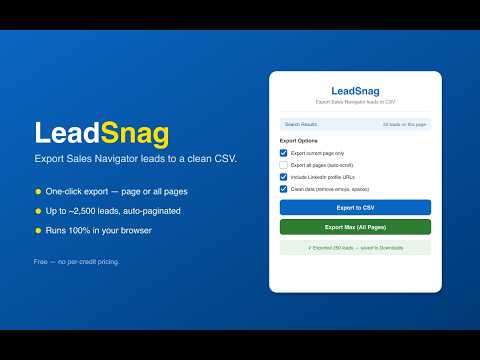
LeadSnag turns a LinkedIn Sales Navigator search or lead list into a clean, ready-to-use CSV in one click — without per-credit pricing. Most export tools charge by the credit, and it adds up fast. Sales is already an uphill battle. LeadSnag is free WHAT YOU CAN DO • Export the leads on the current Sales Navigator search page • Export across multiple pages automatically (up to ~2,500 leads) • Export a person's connections via the "Connection of" filter • Export from saved lead lists • Clean columns: First Name, Last Name, Job Title, Company, Location, Connection degree, Mutual count, and a clickable LinkedIn URL • Copy to clipboard or download as CSV • Automatic de-duplication across pages HOW IT WORKS 1. Open a Sales Navigator search or list 2. Click LeadSnag and choose "current page" or "all pages" 3. Your CSV downloads automatically to your Downloads folder PRIVATE BY DESIGN LeadSnag runs entirely in your browser. The lead data you export never touches our servers — there are no analytics, no tracking, and no external network calls. The only thing stored is a local activation flag. FREE — SUPPORT OPTIONAL LeadSnag is completely free. If it saves you money and you feel like it, you can buy me a coffee. Totally optional — the tool stays free either way. ACTIVATION On first run, paste a free code from https://leadsnag.vercel.app (one-time per browser). — Not affiliated with or endorsed by LinkedIn. For personal use. Please use responsibly and in line with LinkedIn's Terms of Service and applicable privacy laws (e.g., GDPR, CCPA).
0 out of 5No ratings
Details
- Version1.0.9
- UpdatedSeptember 29, 2026
- Size35.0KiB
- LanguagesEnglish
- Developer
Email
zacharyppowers@gmail.com - Non-traderThis developer has not identified itself as a trader. For consumers in the European Union, please note that consumer rights do not apply to contracts between you and this developer.
Privacy

This developer declares that your data is
- Not being sold to third parties, outside of the approved use cases
- Not being used or transferred for purposes that are unrelated to the item's core functionality
- Not being used or transferred to determine creditworthiness or for lending purposes