


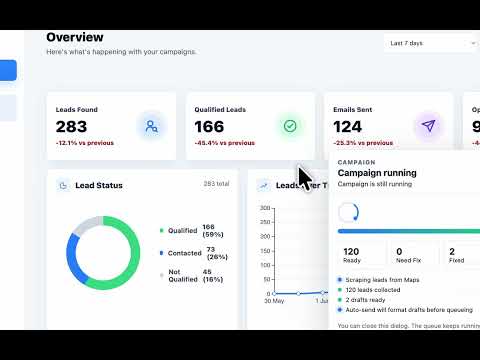
Overview
Automate B2B lead generation! AI-powered research assistant to find local business leads, verified emails, and send cold outreach.
Stop wasting hours doing manual B2B lead research! LeadsIn is the ultimate all-in-one Web Research Assistant, Email Finder, and Cold Email Automation tool designed for B2B businesses, marketing agencies, and freelancers. Turn your web browsing into an automated sales pipeline. Whether you are researching local businesses on web directories, visiting company websites, or verifying contact details, LeadsIn helps you organize your prospects and send hyper-personalized cold outreach directly from your browser. HOW IT WORKS: 1. Browse to any business directory or company website. 2. LeadsIn helps you capture and organize the business listings you are viewing into a structured lead list. 3. Our AI visits the captured business websites to find verified emails, social media profiles, and key data points. 4. The AI qualifies the lead (Hot, Warm, or Cold) and drafts a hyper-personalized cold email based on their website's content. 5. Launch an automated email campaign to reach out to your new leads instantly! KEY FEATURES (ALL-IN-ONE LEAD GENERATION ENGINE): 1: Smart Data Capture & Organization Bypass manual copy-pasting. Easily capture company names, websites, phone numbers, and addresses from the business directories you browse. Perfect for building local B2B lead lists. 2: Advanced Email Finder & Verifier Don't settle for generic info@ emails. Our enrichment engine scans business websites to extract decision-maker emails, LinkedIn profiles, Facebook pages, and Instagram handles. 3: AI Lead Qualification & Enrichment Stop guessing which leads are good. LeadsIn reads the website content of each captured business and automatically scores them. It identifies their pain points and value propositions so you know exactly how to pitch them. 4: AI Cold Email Writer Tired of writing generic cold emails? Connect your OpenAI, Anthropic, or Groq API, and our AI will draft hyper-personalized, high-converting outreach messages tailored to each specific business you research. 5: Automated Cold Email Campaigns No need to pay for expensive third-party email software. Connect your own SMTP, cPanel, or Plunk email accounts directly to LeadsIn. Create drip campaigns, set daily sending limits, and track your outreach success right from the dashboard. 6: Export to CSV / Excel Easily download your enriched B2B leads list as a CSV file to import into your favorite CRM (HubSpot, Salesforce, GoHighLevel, etc.). 100% Safe & Secure LeadsIn runs locally in your browser. We do not store your data on our servers. Your API keys, email credentials, and lead lists remain safely encrypted on your own machine. WHO IS LEADSIN FOR? - B2B Sales Teams looking to build lead lists efficiently. - Marketing Agencies finding local clients for SEO, Ads, or Web Design. - Freelancers hunting for high-paying gigs. - Startups needing an affordable, automated go-to-market strategy. Say goodbye to expensive monthly subscriptions and disjointed workflows. Install LeadsIn today and supercharge your B2B lead generation!
5 out of 510 ratings
Details
- Version9.9.0
- UpdatedJuly 11, 2026
- FeaturesOffers in-app purchases
- Size3.68MiB
- LanguagesEnglish (United States)
- DeveloperdownlabsWebsite
Office #362 H3-Block Opposite to Emporium Mall LHR 54000 Lahore 54000 PKEmail
info@downlabs.coPhone
+92 320 7899686 - TraderThis developer has identified itself as a trader per the definition from the European Union and committed to only offer products or services that comply with EU laws.
Privacy

LeadsIn: B2B Lead Generation has disclosed the following information regarding the collection and usage of your data. More detailed information can be found in the developer's privacy policy.
LeadsIn: B2B Lead Generation handles the following:
This developer declares that your data is
- Not being sold to third parties, outside of the approved use cases
- Not being used or transferred for purposes that are unrelated to the item's core functionality
- Not being used or transferred to determine creditworthiness or for lending purposes
Support
For help with questions, suggestions, or problems, please open this page on your desktop browser