

ScribeIt - SOP & Step-by-Step Guide Maker
2 ratings
)
Overview
Record any workflow in your browser and turn it into a step-by-step guide with screenshots. Export to PDF or share a link.
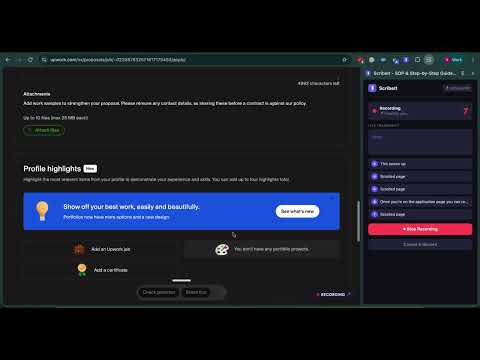
Turn a task you do in your browser into a written SOP, without writing it. Most process documentation never gets written, because writing it is the boring part. You already know how to do the task. Documenting it means doing it slowly, screenshotting every step, pasting the images somewhere, and typing out what you just did. So it stays on the list and the knowledge stays in your head. ScribeIt records the task instead. Press Record in the side panel, do the work, and talk through it the way you would if someone were sitting next to you. When you stop, you have a step-by-step guide with a screenshot on every step and your own explanation attached to the step it belongs to. HOW IT WORKS 1. Open the side panel and press Record. 2. Do the task. Explain out loud as you go. 3. Press Stop. Fix anything that needs fixing, then export a PDF or share a link. WHAT MAKES IT DIFFERENT Other tools capture your clicks and then ask you to type the explanation afterwards, which is exactly the part people skip. ScribeIt listens while you work. What you say is transcribed and attached to the step you were on when you said it, so the reasoning stays with the click instead of getting lost. WHAT IT CAPTURES - Clicks, as numbered steps, with a screenshot on each one - Real field labels in the step text, so you get "Entered your email in the Email field" and not a reference to an element ID - Your spoken narration, transcribed and matched to the right step, including inside iframes - Page changes, marked in the guide so the reader knows where they have landed WHAT IT LEAVES OUT, ON PURPOSE - Scrolling. Scrolling is not a step. - Typing as its own event. Typing into a field folds into the click that focused it, so six actions give you five steps instead of ten. - Passwords and other sensitive fields. Those are masked, and the value is never captured. EDITING AND SHARING - Rename, reorder and delete steps, with undo - Retitle the guide - Run an AI rewrite to tidy up the step wording. It leaves your spoken narration alone. - Export as a PDF - Share as a link WHO IT IS FOR - Salesforce admins and consultants writing runbooks and client handover docs - Ops people documenting the tools they run - Anyone onboarding a new hire on a process they only want to explain once - Agencies and freelancers handing a process back to a client PRICING - No account: 3 guides - Free account: 5 guides - Pro: $6.99 a month for unlimited guides PRIVACY Guides are stored on your own machine. If you sign in, you can choose to sync them to the cloud. Recording only runs while you have it running, and nothing is captured before you press Record or after you press Stop. Password and other sensitive fields are masked during capture. Found a bug or have a question: info@eezentek.com
5 out of 52 ratings
Details
- Version1.5.2
- UpdatedOctober 28, 2026
- Size173KiB
- LanguagesEnglish
- Developer
Email
sutha.parath@eezentek.com - Non-traderThis developer has not identified itself as a trader. For consumers in the European Union, please note that consumer rights do not apply to contracts between you and this developer.
Privacy

ScribeIt - SOP & Step-by-Step Guide Maker has disclosed the following information regarding the collection and usage of your data. More detailed information can be found in the developer's privacy policy.
ScribeIt - SOP & Step-by-Step Guide Maker handles the following:
This developer declares that your data is
- Not being sold to third parties, outside of the approved use cases
- Not being used or transferred for purposes that are unrelated to the item's core functionality
- Not being used or transferred to determine creditworthiness or for lending purposes