


Overview
Copy, save, and restore open tab information in a format that fits your work.
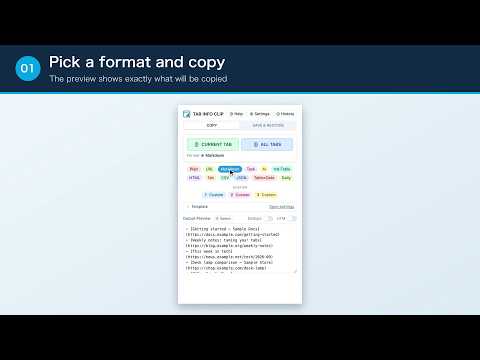
TAB INFO CLIP turns your open tab information into a clean, reusable list. Key features • Copy the current tab, the tabs you select, or every tab in the current window • 12 built-in formats covering bullet lists, tables, and structured data. Edit any of them, or add up to 10 of your own • Save tab groups with a note, then restore all tabs or just one later, in the current window or a new one. Pick which tabs to keep, then reorder and color-code the groups • Reuse recent results from clipboard history • Merge duplicate tabs and strip tracking parameters How to use 1. Select the TAB INFO CLIP icon in the toolbar 2. Choose a format 3. Select “Current Tab” or “All Tabs” 4. Paste the result into notes, chat, documents, or a spreadsheet Good for • Sharing the pages you researched with your team • Keeping a readable record of what you read • Turning a pile of tabs into a table you can sort • Saving a working session so you can reopen it later About the summary-request template It simply adds a request alongside the copied titles and links. TAB INFO CLIP does not read page content or generate summaries itself. Privacy The extension does not read page content. Tab information, saved groups, clipboard history, templates, and settings are processed and stored only in your browser. Nothing is sent to an external server, and no account is required. Limitations Incognito windows and internal browser pages such as chrome:// are not supported. Saved data is not synchronized between devices. Support https://elephantnode.com/app/tab-info-clip/ Version 3.9.0 Choose whether duplicates are merged when saving, and whether pages you already have open are reopened when restoring. You can also rewrite a template just before pasting, and the copy and save screens have been redesigned. Version 3.10.0 The popup now opens on the screen you used last, and the note you leave when saving is easier to spot in the list. Version 3.11.0 Copy only the tabs you choose. Select them in the browser's tab bar before opening the popup, or pick them from a list inside it. Version 3.12.0 Pick which tabs to keep, just as you do for copying. Drag groups to reorder them, and change their color or note at any time. You can also pick which screen the popup opens on. Version 3.13.0 Open a saved group in a new window instead of adding it to the current one. The same option is available from clipboard history.
5 out of 53 ratings
Details
- Version3.13.0
- UpdatedOctober 7, 2026
- Size210KiB
- Languages2 languages
- DeveloperWebsite
Email
app@elephantnode.com - Non-traderThis developer has not identified itself as a trader. For consumers in the European Union, please note that consumer rights do not apply to contracts between you and this developer.
Privacy

This developer declares that your data is
- Not being sold to third parties, outside of the approved use cases
- Not being used or transferred for purposes that are unrelated to the item's core functionality
- Not being used or transferred to determine creditworthiness or for lending purposes
Support
For help with questions, suggestions, or problems, visit the developer's support site