

Preview & Shorts Controls for YouTube

Overview
Inline video previews, preview volume and seeking, and optional Shorts information hiding for YouTube.
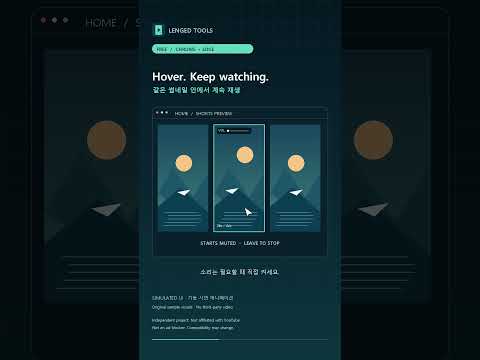
Watch more before opening a video. Play home Shorts and watch-page recommendations inside their original thumbnails. Control preview sound and volume, and seek through regular home videos, home Shorts and recommendations with current/total time. Each new controlled preview starts muted. Recommendation preview sound temporarily mutes the main video, then restores its previous audio state when you leave. Controls hide after 3 seconds without pointer movement and return when you move within the preview. Dragging and keyboard operation keep them visible. Optional Shorts title/channel auto-hide reveals information when you hover over the viewing video. Individual feature switches, hover delay and volume are saved locally. Version 0.6.2 restores Shorts previews after a YouTube player structure change and adds home video seeking. All features are free. Donations are optional; no paid unlocks. This is not an ad blocker. Depends on YouTube's page and player; some ads, live or restricted content may behave differently. Independent project; not affiliated with YouTube, Google or Microsoft. ### Single purpose Improve YouTube desktop thumbnail preview playback, audio and seeking, and optional Shorts information visibility. ### Permissions justification YouTube host access: Detect page-local cards and operate preview players, audio/seek controls and Shorts information visibility on www.youtube.com only. Storage: Save local feature settings, hover delay and volume. Scripting: Apply fixed packaged CSS to repair hidden native preview video on YouTube. No remotely hosted extension code is downloaded or executed by the extension. ### 更新/What's new Version 0.6.2 restores home Shorts playback after YouTube changed its preview structure and adds a seek slider with current/total time to regular home-video previews. Includes an independent home seek option, draggable volume and seeking, 3-second idle controls, and existing recommendation audio restoration. No new permissions. All features remain free. ### Reviewer instructions No extension login is required. Refresh youtube.com after installation. Hover a home Shorts thumbnail for about 0.4 seconds and verify actual muted playback in place. Adjust volume and seek. Stop moving for 3 seconds; only controls hide. Move to reveal them, then leave to restore the thumbnail. Hover a regular home video and use its bottom seek bar. On a watch page, enable a normal recommendation preview's sound, seek and leave; the main video's previous audio state should return. Toggle individual features through the extension toolbar icon. Finite duration is required for seeking; live and restricted content may behave differently. Disable older separate copies of Shorts In-place Preview, Preview Volume Control and Shorts Clear View to avoid duplicate controls. ## 복사용 한국어 제품 설명 홈 Shorts와 우측 추천을 원래 썸네일 안에서 계속 재생하고, 미리보기 소리·볼륨·재생 위치를 조절하는 무료 확장입니다. 홈 일반 영상에도 현재·전체 시간과 구간 조절을 제공합니다. 새 미리보기는 무음으로 시작하며 우측 추천의 소리를 켜면 본영상은 잠시 음소거되고, 커서를 빼면 이전 상태로 돌아갑니다. 3초간 커서가 멈추면 조절기만 숨기고 움직이면 다시 표시합니다. 드래그·키보드 조작 중에는 표시를 유지합니다. Shorts 시청 화면의 제목·채널 정보 숨김도 선택할 수 있습니다. 기능별 옵션과 음량은 기기에 저장합니다. 모든 기능은 무료이며 후원은 선택입니다. 0.6.2: YouTube 구조 변경으로 멈춘 홈 Shorts 재생 복구, 홈 일반 영상 구간 조절 추가. 광고 차단 도구가 아니며 YouTube 변경과 콘텐츠 조건에 영향을 받을 수 있습니다. YouTube·Google·Microsoft와 무관한 독립 개발 제품입니다.
0 out of 5No ratings
Details
- Version0.6.2
- UpdatedOctober 23, 2026
- Offered bylengedtools
- Size53.96KiB
- LanguagesEnglish (United States)
- Developer
Email
lengedtools@gmail.com - Non-traderThis developer has not identified itself as a trader. For consumers in the European Union, please note that consumer rights do not apply to contracts between you and this developer.
Privacy

This developer declares that your data is
- Not being sold to third parties, outside of the approved use cases
- Not being used or transferred for purposes that are unrelated to the item's core functionality
- Not being used or transferred to determine creditworthiness or for lending purposes
Support
For help with questions, suggestions, or problems, please open this page on your desktop browser