

TableHarvest: Export Tables to Excel, CSV & Sheets by HeroBytes

Overview
Copy or download any web table to Excel, CSV or Google Sheets in one click. Handles merged cells. 100% local, no sign-up.
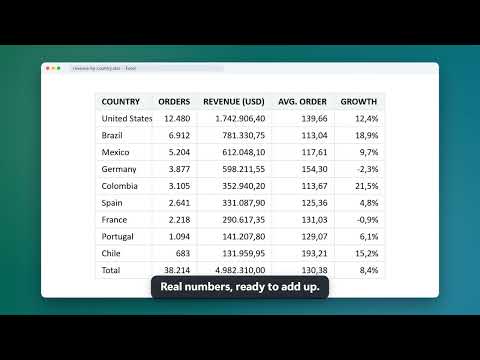
TableHarvest turns any table on a web page into a spreadsheet. Click the icon (or right-click the table), check the preview and copy or download. Nothing is uploaded anywhere: the file is built inside your browser. WHAT IT DOES (FREE, UNLIMITED) - Finds every table on the page: regular HTML tables, div-based data grids (ARIA grids), CSS tables and tables inside frames. Virtualized grids (which only render the rows on screen) export the rows currently rendered; use multi-page capture after scrolling to collect the rest. - "Export" badge on each table, or right-click > "Export this table". - Preview before exporting, with the exact rows and columns you will get. - Copy for Excel / Google Sheets: paste with Ctrl+V and it lands as a grid, not as text. - Download CSV with the separator your Excel expects (comma, or semicolon for Spanish, Portuguese, German and French Excel) and the encoding you need (UTF-8 with BOM, UTF-8, UTF-16, Windows-1252). - Merged cells (rowspan / colspan) are laid out correctly. Line breaks inside cells are kept. - Header rows detected automatically; you can override them. Optional: only visible rows, include link URLs. - Form fields inside tables (inputs, checkboxes, dropdowns) export their current value. TABLEHARVEST PRO (one license key for all your computers, works offline) - Download as Excel (.xlsx), with frozen header row and filters ready. - Export all tables on a page at once: one workbook with one sheet per table, or one CSV per table. - Multi-page capture: paginated tables (page 1, 2, 3...) collected into one export. - Export to Google Sheets (copy and open a new sheet, ready to paste). PRIVACY TableHarvest only runs when you click it. It does not collect or transmit page content, browsing history or personal data. There is no account and no analytics. The only network request is the license check when you activate Pro. "Google Sheets" export copies the table and opens a new sheet for you to paste into; no Google account is accessed. Full policy: see the link on this page. PERMISSIONS, EXPLAINED - "activeTab" and "scripting": read the tables of the page you are on, only after you click the icon or the menu. - "contextMenus": the right-click entry. - "storage": your preferences and your license key, kept locally. Optional, per site and only if you choose it in the popup ("Always show badges on this site"): run automatically on that site, so badges appear without clicking. Access to all sites is never requested. Works with Wikipedia, bank statements, admin panels, reports, e-commerce back offices, data grids built with React or Angular, and most pages that show data in rows and columns. If a table does not export the way you expect, write to support and it will be fixed in the next version. Made by HeroBytes.
0 out of 5No ratings
Details
- Version1.0.1
- UpdatedOctober 29, 2026
- FeaturesOffers in-app purchases
- Offered byHeroBytes
- Size64.68KiB
- LanguagesEnglish
- Developer
Email
sebas152000@gmail.com - Non-traderThis developer has not identified itself as a trader. For consumers in the European Union, please note that consumer rights do not apply to contracts between you and this developer.
Privacy

This developer declares that your data is
- Not being sold to third parties, outside of the approved use cases
- Not being used or transferred for purposes that are unrelated to the item's core functionality
- Not being used or transferred to determine creditworthiness or for lending purposes
Support
For help with questions, suggestions, or problems, visit the developer's support site