


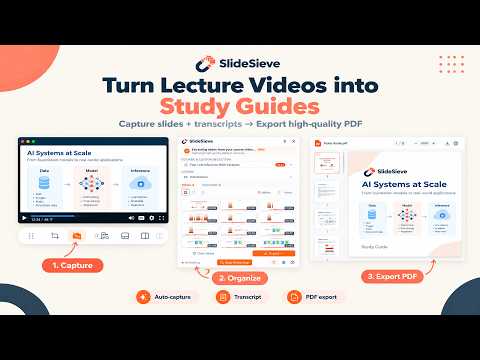
Overview
Auto-capture slides & transcripts (TXT/SRT/VTT) from YouTube, Coursera, Udemy & DeepLearning.AI. Removes webcam overlay. 100% local.
Tired of pausing lecture videos just to screenshot slides — or rewinding to catch what was said? SlideSieve captures slides and extracts synced transcripts automatically, on Coursera, Udemy, YouTube, and DeepLearning.AI. Zero uploads, everything happens on your device. 🎯 Auto Slide Detection Identifies real slide frames across any course layout, no setup needed. 🚫 Instructor Frame Filter Skips frames where the instructor's face or webcam dominates the screen. 🧹 Smart Deduplication Catches bullet-point builds and progressive reveals without saving 50 near-duplicate slides. 📸 Manual Snap Instantly capture any specific frame with one click, regardless of auto-detection. 🎛️ In-Page Floating Toolbar Start capturing, snap a manual frame, or extract the transcript directly below the video, without opening the side panel. 🗺️ Slide Detection Zone Some courses show the instructor's webcam as a floating window over the slides. Draw a box over either the slide area or the webcam itself, and SlideSieve analyzes only the zone that matters — whichever's easier to trace for that course layout. Takes ten seconds to set up, and persists for every lesson in the course. ✨ PiP Magic Eraser When your zone is set to exclude the webcam, saved slides are automatically reconstructed to remove it — not just cropped or blurred. SlideSieve scans a buffer of recent frames to find the cleanest version of the slide, then blends the real background pixels back in. No trace of the webcam remains in exported slides or the PDF. 📝 Transcript Extraction Get the full lesson transcript, synced live to the video with the current sentence highlighted as it's spoken. Switch between Timeline view (timestamped rows) and Article view (paragraph reading mode), then export as TXT, SRT, or VTT, or copy to clipboard. 🖼️ Multi-View Slide Browser Review captured slides in grid, list, or full-screen view, and delete unwanted frames before exporting. 📄 PDF & Image Export Compile slides into a clean multi-page PDF, or export individually, at their original aspect ratio. 🗂️ Course-Scoped Storage Slides are organized by course and lesson, stored locally in your browser. 🌐 Available in 15 languages: English, German, French, Spanish (Spain & Latin America), Italian, Portuguese (Portugal & Brazil), Japanese, Korean, Simplified Chinese, Traditional Chinese, Indonesian, Hebrew, and Turkish. Auto-detected on install, changeable anytime in Settings. 🔒 100% Private All captured slides are stored entirely on your device. SlideSieve collects no personal data and transmits nothing to external servers. 💡 Free Plan 50 slide captures, no card required. Pro plans available for unlimited slides and exports. 📚 Perfect for students saving lecture slides from Coursera, Udemy, or DeepLearning.AI, anyone building PDF study notes from YouTube educational videos, and language learners who want SRT/VTT subtitle files from online lectures. 📋 How to Use: 1. Navigate to any supported video course page. 2. Click "Start Auto Capture" in the floating toolbar below the video. 2a. (Optional) Click the Detection Zone icon to draw a box around either the slide area (to detect within it) or the instructor's webcam (to exclude it) — whichever is smaller and easier to trace. 3. Play the video — slides are detected and captured automatically. 4. Open the side panel to watch captured slides in real time. 5. Use "Snap" anytime to manually capture a frame. 6. Hover a thumbnail and click × to delete unwanted frames. 7. Click "Export" to download as PDF or images. ⚖️ Legal Disclaimer & Trademark Notice: SlideSieve is an independent software tool developed to assist students and learners with personal study notes. SlideSieve is not affiliated, associated, authorized, endorsed by, or in any way officially connected with Coursera, Udemy, YouTube, DeepLearning.AI, or Google LLC. All product names, logos, brands, and registered trademarks mentioned are the property of their respective owners and are used solely for identification and educational description purposes under fair use.
0 out of 5No ratings
Details
- Version1.1.3
- UpdatedSeptember 29, 2026
- FeaturesOffers in-app purchases
- Size7.47MiB
- Languages65 languages
- DeveloperWebsite
Email
iprowlee@gmail.com - Non-traderThis developer has not identified itself as a trader. For consumers in the European Union, please note that consumer rights do not apply to contracts between you and this developer.
Privacy

SlideSieve: Auto Slide & Transcript Capture has disclosed the following information regarding the collection and usage of your data. More detailed information can be found in the developer's privacy policy.
SlideSieve: Auto Slide & Transcript Capture handles the following:
This developer declares that your data is
- Not being sold to third parties, outside of the approved use cases
- Not being used or transferred for purposes that are unrelated to the item's core functionality
- Not being used or transferred to determine creditworthiness or for lending purposes
Support
For help with questions, suggestions, or problems, visit the developer's support site