

Practice Hero: YouTube Music Looper & Speed Trainer
3 ratings
)
Overview
Practice music on YouTube with A/B loops, HD Slow, pitch shift, a metronome, custom hotkeys, and automatic Speed Ladders.
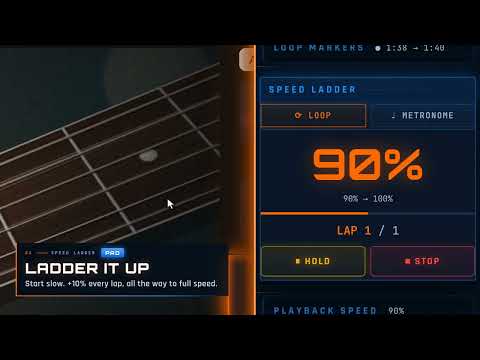
Turn YouTube into your practice room. Practice Hero is a Chrome extension for musicians who use YouTube to learn songs, work through lessons, and practice difficult passages at their own pace. Loop a section, slow it down, adjust the pitch, practice with a metronome, and build your speed gradually without constantly reaching for the controls. Practice Hero includes: • A/B looping to repeat the exact section you want to practice • HD Slow Mode for clearer audio at slower playback speeds • Playback speed control from 25% to 400% • Pitch shifting and transposition without changing playback speed • A built-in metronome for timing and rhythm practice • BPM detection for supported playback • Custom keyboard shortcuts for common practice controls • Practice history so you can quickly return to videos you have worked on before Practice Hero Premium adds more structured practice tools. Speed Ladder lets you choose a starting speed, target speed, step size, and number of repetitions. Practice Hero then increases the playback speed automatically as you work through the passage. If you need more time at a step, Hold keeps you there until you are ready to continue. Metronome Ladder applies the same idea to tempo practice. Set a starting BPM, target BPM, tempo increase, and number of bars per step, and Practice Hero gradually moves the metronome through your practice routine. Premium also includes saved loops, practice sessions, snapshots, notes, progress statistics, and additional metronome options. Practice Hero is built to make YouTube practice more focused. Instead of repeatedly rewinding, changing the speed, or adjusting the metronome between attempts, you can set up your practice session and spend more time playing. WHAT'S NEW IN VERSION 10.1.0 This update adds HD Slow Mode, customizable keyboard shortcuts, an upgraded BPM detector, and a range of improvements to looping, playback, Speed Ladder, and Metronome Ladder behavior. PRIVACY & COMPATIBILITY Your Practice Hero settings, saved practice data, notes, and history are stored locally in your browser. Practice Hero is designed for YouTube video pages in desktop Google Chrome. BPM detection is available during supported playback. HD Slow Mode and pitch shifting must be turned off during a BPM scan. Practice Hero is an independent product and is not affiliated with, endorsed by, or sponsored by YouTube or Google. Install Practice Hero and turn your next YouTube practice session into a more focused routine.
5 out of 53 ratings
Details
- Version10.1.0
- UpdatedOctober 6, 2026
- FeaturesOffers in-app purchases
- Offered bypractice.heroix
- Size979KiB
- LanguagesEnglish
- DeveloperDylan Hoey
18 Summer St Saco, ME 04072-2837 USEmail
practice.heroix@gmail.comPhone
+1 207-450-9919 - TraderThis developer has identified itself as a trader per the definition from the European Union and committed to only offer products or services that comply with EU laws.
Privacy

This developer declares that your data is
- Not being sold to third parties, outside of the approved use cases
- Not being used or transferred for purposes that are unrelated to the item's core functionality
- Not being used or transferred to determine creditworthiness or for lending purposes
Support
For help with questions, suggestions, or problems, visit the developer's support site