

Launcher

Overview
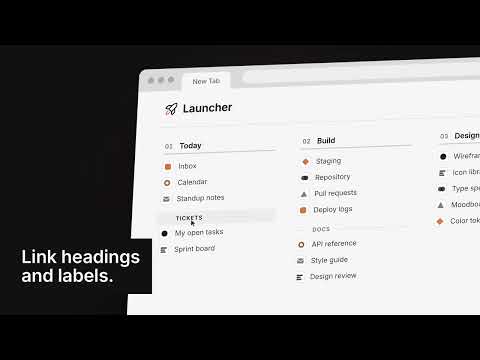
Replace the new tab page with a columned view of a bookmark folder's subfolders.
Launcher turns a bookmark folder into your new tab page. Choose any folder in your bookmarks. Each folder inside it becomes a column, and each bookmark inside those becomes a link with its site's icon. There's no separate list to keep up to date: Launcher is a view of your real bookmarks, so anything you change here shows up in your browser's bookmarks, and the other way round. Organise in place • Drag links to reorder them, or move them to another column. • Drag columns to reorder them. • Add, rename or delete links and columns without leaving the tab. • Add group labels to split a long column into sections. • Give a column heading its own link, so the heading opens a page. Make it yours • Light and dark themes, or match your browser. • Three to seven columns across, with extra folders wrapping onto a second row. • A 12- or 24-hour clock. Private by design • No account and no sign-up. • No analytics, no tracking, no servers. Your bookmarks and history stay in your browser. • Site icons come from sites you visit, never from a lookup service.
0 out of 5No ratings
Details
- Version0.7.1
- UpdatedNovember 29, 2026
- Offered byFrost Dev Co
- Size237KiB
- LanguagesEnglish
- Developer
Email
andy@frostdev.co - Non-traderThis developer has not identified itself as a trader. For consumers in the European Union, please note that consumer rights do not apply to contracts between you and this developer.
Privacy

This developer declares that your data is
- Not being sold to third parties, outside of the approved use cases
- Not being used or transferred for purposes that are unrelated to the item's core functionality
- Not being used or transferred to determine creditworthiness or for lending purposes