


Overview
Write maths anywhere: type \alpha or $x^2$ in any text box to get α or x², or render LaTeX to an image to paste.
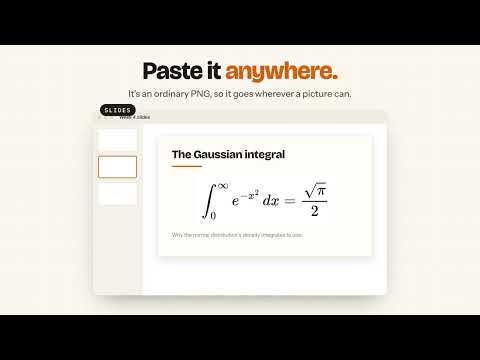
Type LaTeX in any text box and get real symbols the moment you press space: \alpha becomes α, $x^2$ becomes x². Select LaTeX on any page, right-click and choose Render selection as image. Copy it as a PNG and paste it into a chat, an email, a slide or a doc. TYPING • \alpha → α $x^2$ → x² \mathbb{R} → ℝ \sum_{i=1}^{n} → ∑ᵢ₌₁ⁿ • 202 symbols, plus superscripts, subscripts, fractions and roots • The result is ordinary text, so anyone can read, copy and search it • If something can't be written exactly in plain text, a short note says what it did RENDERER • For maths plain text can't hold, like stacked fractions and matrices • Live preview, command suggestions, colours, braces, a transparent background and a history • Alt+Shift+E opens it. Ctrl+Enter (Cmd+Enter on a Mac) copies the PNG WHERE IT WORKS • Text boxes, comment fields, web chats and Google Docs (not Sheets, Slides or the address bar) • Stays quiet on Overleaf, other LaTeX sites and code editors. Alt+Shift+L pauses it anywhere PRIVATE • Nothing you type is stored or sent, and it makes no network requests FREE AND OPEN SOURCE • Mac menu bar app that works in every app, not just Chrome: https://github.com/SuperWalrus01/LaTeX-Squiggly/releases/latest • Guide: https://superwalrus01.github.io/LaTeX-Squiggly/guide.html • Source code: https://github.com/SuperWalrus01/LaTeX-Squiggly • Report a problem: https://github.com/SuperWalrus01/LaTeX-Squiggly/issues
5 out of 52 ratings
Details
- Version0.3.0
- UpdatedOctober 6, 2026
- Size693KiB
- LanguagesEnglish
- DeveloperWebsite
Email
keenanjusak1@gmail.com - Non-traderThis developer has not identified itself as a trader. For consumers in the European Union, please note that consumer rights do not apply to contracts between you and this developer.
Privacy

LaTeX Squiggly has disclosed the following information regarding the collection and usage of your data. More detailed information can be found in the developer's privacy policy.
LaTeX Squiggly handles the following:
This developer declares that your data is
- Not being sold to third parties, outside of the approved use cases
- Not being used or transferred for purposes that are unrelated to the item's core functionality
- Not being used or transferred to determine creditworthiness or for lending purposes
Support
For help with questions, suggestions, or problems, visit the developer's support site