

LaTeX PDF Search

Overview
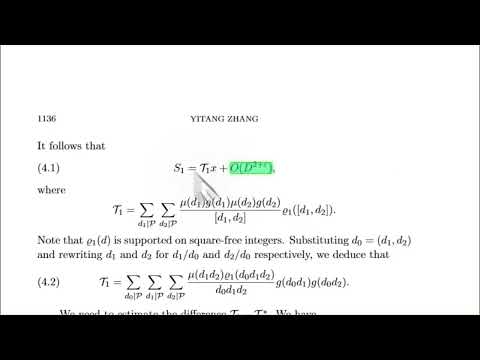
A tool to search for mathematical text in PDFs using LaTeX code. Think Ctrl+F for maths - literally: press Ctrl+F in the viewer to…
A tool to search for mathematical text in PDFs using LaTeX code. Think Ctrl+F for maths - literally: press Ctrl+F in the viewer to start searching. How to use: • Open a PDF - online or from your computer. • Click the LaTeX PDF Search icon (or right-click a PDF link, as shown in the video). • Once the PDF is open in the viewer, you can also just press Ctrl+F (Cmd+F on Mac) to bring up the search sidebar. • Type your equation in the sidebar and hit Search. • Matches light up on the page; use Next and Previous to jump between them. • For PDFs on your computer, turn on "Allow access to file URLs" once at chrome://extensions.
0 out of 5No ratings
Details
- Version3.3.0
- UpdatedJuly 29, 2026
- Offered bychristianndjanda
- Size863KiB
- LanguagesEnglish
- Developer
Email
christianndjanda@gmail.com - Non-traderThis developer has not identified itself as a trader. For consumers in the European Union, please note that consumer rights do not apply to contracts between you and this developer.
Privacy

LaTeX PDF Search has disclosed the following information regarding the collection and usage of your data. More detailed information can be found in the developer's privacy policy.
LaTeX PDF Search handles the following:
This developer declares that your data is
- Not being sold to third parties, outside of the approved use cases
- Not being used or transferred for purposes that are unrelated to the item's core functionality
- Not being used or transferred to determine creditworthiness or for lending purposes