

Lataaka: Image & Media Downloader

Overview
Find the images and media a page uses, then filter, rename, convert to AVIF or WebP and save just what you need.
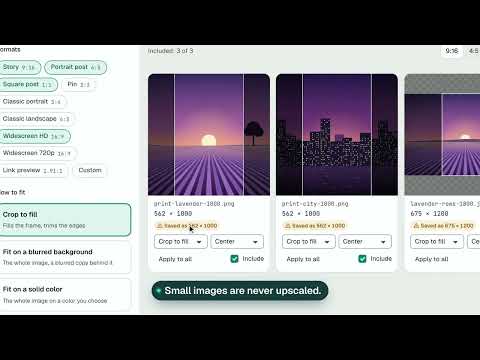
Lataaka finds the images and other media on the page you are looking at and lets you save exactly what you need, the way you want it. What you can do for free: - Scan the page you are on and see everything it uses, sorted by type. - Preview items large, with sizes, format, alt text and where they are on the page. - Get the largest version of an image when the site offers one. - Filter by size, format, shape, site, name or alt text; sort by size, quality or page order; hide exact duplicates. - Save up to 10 files a day, one at a time, with file names from a template. - Convert one image at a time to AVIF, WebP, PNG or JPG, right in your browser. - Save an image in another format from the right-click menu. - Edit an image: crop, rotate, flip and resize it, read its color palette and pick any pixel, then save a copy or copy it. - Resize an image for social media: crop or fit it to Story, post, Pin and other formats, never upscaled by accident. - Copy an image, its link or SVG code. - See your download history. - Work with the keyboard. Scanning and browsing stay free without limits. Free downloads reset at midnight. Pro removes the daily limit and adds the tools for bigger jobs: - Download everything you selected at once, as separate files or one ZIP with folders and a file list. - Collect from several tabs, endless pages and linked pages, and gather finds from many pages in the Basket. - Convert and resize many images at once, including several social formats in one ZIP. - Find look-alike duplicates, export icons as code and sprites, and save font kits. Private by design: Lataaka reads a page only when you ask, keeps your settings, Basket and history in your browser, and has no tracking or ads. Access to all sites is optional and only needed for multi-tab and linked page features. Lataaka does not save content from YouTube, DRM protected media, live streams or paid streaming services. Please respect the rights of the people who make the content you save.
0 out of 5No ratings
Details
- Version0.1.1
- UpdatedNovember 6, 2026
- FeaturesOffers in-app purchases
- Offered byPajaTools
- Size2.44MiB
- Languages21 languages
- DeveloperMykhailo Dmytryshchak
district Pustomytivskyi, village Semenivka, street Shevchenka, building 174 Семенівка, Львівська область 81162 UAEmail
pajatools@gmail.comPhone
+380 99 085 1632 - TraderThis developer has identified itself as a trader per the definition from the European Union and committed to only offer products or services that comply with EU laws.
Privacy

Lataaka: Image & Media Downloader has disclosed the following information regarding the collection and usage of your data. More detailed information can be found in the developer's privacy policy.
Lataaka: Image & Media Downloader handles the following:
This developer declares that your data is
- Not being sold to third parties, outside of the approved use cases
- Not being used or transferred for purposes that are unrelated to the item's core functionality
- Not being used or transferred to determine creditworthiness or for lending purposes
Support
For help with questions, suggestions, or problems, please open this page on your desktop browser