

Ladybird: no-code buttons, links and tooltips
1 rating
)
Overview
Add no-code buttons, links, hidden rules, and automation flows to websites with reusable Password Vault inputs.
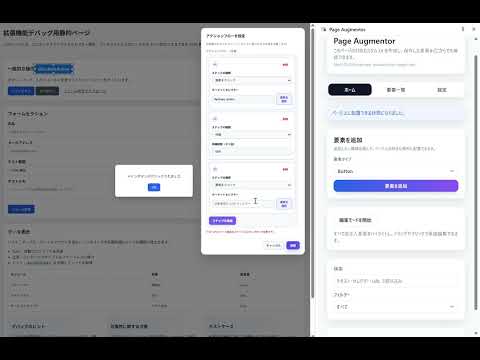
Ladybird helps you customize websites with no-code UI elements, hidden rules, and reusable automation flows. WHAT IT DOES - Add buttons, links, tooltips, and areas to pages without writing code. - Build flows that can click, input, wait, assert, branch, loop, navigate, log, read data sources, set runtime variables, and show popup confirmations. - Hide distracting page elements with manual hidden rules. - Enable built-in automatic ad blocking with a single global toggle. - Review saved site data in Overview and manage import/export in Settings. CORE FEATURES Elements / Flows / Hidden / Overview / Settings - Manage injected UI elements and automation flows from the side panel. - Use Overview to inspect saved site data per site and remove data when needed. Flow Builder - Create reusable runtime variables with `set-variable` steps. - Reuse values across steps with tokens such as `{{var.name}}`, `{{loop.index}}`, and `{{row.index}}`. - Load CSV/TSV data sources and run steps per row. - Show popup checkpoints with custom messages before continuing a flow. Hidden Rules - Add manual hidden rules for the current site. - Built-in ad blocking is global and separate from your manual hidden-rule list. Password Vault - Save reusable passwords for flow input steps in a locally encrypted Password Vault. - Password fields are protected from plain-text flow storage by policy. - If a flow needs the vault while it is locked, Ladybird opens a dedicated extension-owned window for the master password (the password never enters the page) and resumes from the current step on success. Import / Export - Export saved configuration as JSON. - Export can optionally include Password Vault data after vault-password confirmation. - Import supports restoring saved configuration and optional vault data. Multi-language UI - English / Japanese / Simplified Chinese interface support. TYPICAL USE CASES - Add quick action buttons to frequently used websites - Reuse form-filling flows for repeated tasks - Run semi-automated flows with popup confirmations and variables - Hide banners, repeated UI sections, or common ads you do not want to see PRIVACY & SECURITY - Data is stored locally in `chrome.storage.local` unless you export it. - Password Vault data is encrypted locally. - Ladybird does not upload your configuration data to a telemetry backend. - Exported files are your responsibility to store securely. - If you forget the vault password, vault contents cannot be recovered and must be reset. LIMITATIONS - Some sites may change DOM structure frequently, which can break selectors. - Some sites with strict CSP or highly dynamic pages may reduce injection stability. - Cross-origin iframe automation is limited and may not work in all cases. - Automation only runs based on your configuration and page state; site compatibility is not guaranteed. ----- ver 2.0.0 This update focuses on Password Vault usability and flow run recovery. - Improved password input binding UX in flows, with clearer vault-based guidance for password fields. - Added a reset flow for forgotten Password Vault passwords (vault contents cannot be recovered; you can reset and rebind). - Improved handling for broken vault bindings after reset, with clearer prompts to rebind missing passwords. Flow run experience improvements: - When a flow needs the vault while the side panel is closed, Ladybird can now show an in-page vault unlock prompt and continue from the current step after unlock. - Clearer feedback when unlock is cancelled or interrupted by page refresh/navigation. - Popup step UI is more visible and easier to confirm. Also includes stability and UI/i18n polish across recent screens. --- ver 2.0.2 This release focuses on Password Vault security and iframe support. - Password Vault: the master password is now entered in a dedicated extension-owned window, so page scripts can no longer observe it (it is no longer typed into the page). - Flows can now target elements inside iframes via per-step frame matching captured at recording time. - Long-running flows are now safely failed when the browser suspends the background worker mid-run, instead of getting stuck. - Stronger vault encryption (PBKDF2 hardened to 600k rounds; the AES key is kept non-extractable inside the service worker). Also includes sidepanel and flow-runner polish across recent screens.
5 out of 51 rating
Details
- Version2.0.2
- UpdatedApril 26, 2026
- Offered bywangbh2011
- Size270KiB
- Languages3 languages
- Developer
Email
bq.weapons@gmail.com - Non-traderThis developer has not identified itself as a trader. For consumers in the European Union, please note that consumer rights do not apply to contracts between you and this developer.
Privacy

This developer declares that your data is
- Not being sold to third parties, outside of the approved use cases
- Not being used or transferred for purposes that are unrelated to the item's core functionality
- Not being used or transferred to determine creditworthiness or for lending purposes
Support
For help with questions, suggestions, or problems, please open this page on your desktop browser