

Kyte - Best Website and URL Level Blocker

Overview
Block sites by domain or URL path. Run free focus sessions with optional paid Locked In Mode.
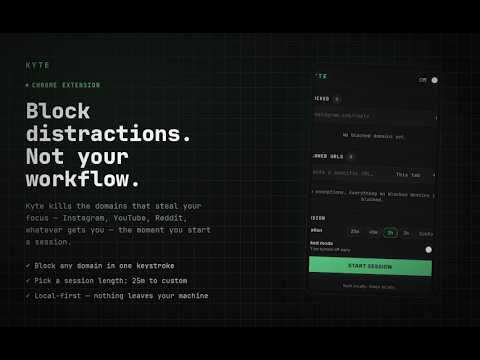
Kyte is a focused website blocker that works at the URL level — not just the domain level. Block entire domains or specific paths: Add instagram.com to block all of Instagram. Add instagram.com/reels to block only the Reels feed while keeping the rest of Instagram accessible. Add both entries to combine them. Allow one exception per blocked domain: If youtube.com is blocked but you need to watch a specific tutorial, paste the exact URL into the Allowed URLs list. Only that URL stays accessible — everything else on YouTube stays blocked. Run timed focus sessions: Choose a duration (25m, 45m, 1h, 2h, or custom) and start a session. Blocking activates automatically. When the session ends, blocking turns off on its own. Enable Lock Mode to prevent yourself from ending the session early — even from the popup. How to use: 1. Click the Kyte icon in your Chrome toolbar. 2. Add domains or URL paths to the Blocked list. 3. Optionally add specific URLs to the Allowed list to create exceptions. 4. Use the on/off toggle for manual blocking, or set a Session for timed focus. Privacy: All data (blocked sites, allowed URLs, session state) is stored locally on your device using Chrome's storage API. Nothing is sent to any server. No accounts. No analytics.
5 out of 58 ratings
Details
- Version2.4.3
- UpdatedOctober 19, 2026
- FeaturesOffers in-app purchases
- Size43.72KiB
- LanguagesEnglish
- DeveloperWebsite
Email
buildkyte@gmail.com - Non-traderThis developer has not identified itself as a trader. For consumers in the European Union, please note that consumer rights do not apply to contracts between you and this developer.
Privacy

Kyte - Best Website and URL Level Blocker has disclosed the following information regarding the collection and usage of your data. More detailed information can be found in the developer's privacy policy.
Kyte - Best Website and URL Level Blocker handles the following:
This developer declares that your data is
- Not being sold to third parties, outside of the approved use cases
- Not being used or transferred for purposes that are unrelated to the item's core functionality
- Not being used or transferred to determine creditworthiness or for lending purposes
Support
For help with questions, suggestions, or problems, visit the developer's support site