


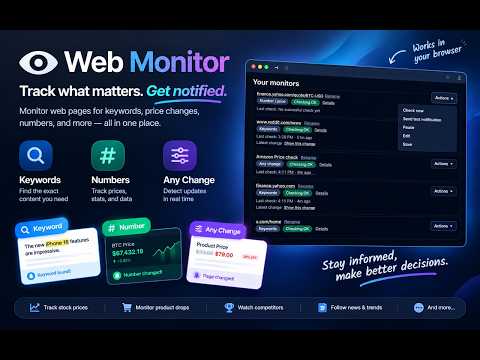
Overview
Detect webpage changes and notify KuroKit, using your browser session. Access is granted per site, only when you add a monitor.
Get notified when a webpage changes — the exact data you care about, not the whole noisy page. KuroKit is a secure website change monitor and automated webpage watcher built for data-driven decisions. You pick a specific region on any public or logged-in page. KuroKit checks it directly in your browser and alerts you the moment that area updates. Use it to track macroeconomic indicators, central bank metrics, and stock indices, or set it up as a competitor page watcher, policy-change alert, job listing tracker, or smart price monitor. If the data is on a screen, KuroKit can watch it. ⚙️ HOW IT WORKS Install & Connect: Add KuroKit Monitor and connect your KuroKit account securely. Select the Target: Open any webpage you want to watch and click the extension. Pick the Exact Data: Click the specific block that matters — a financial metric, a price, a list, a headline, or a system status. Set Rules & Schedule: Define your custom monitoring frequency (e.g., check every minute, hourly, or daily). Set triggers for every change, or filter alerts so you are only notified when specific keywords or topics appear. Get Alerts & Automate: Receive clean, real-time alerts via Email or Telegram. Power users can route data directly via Webhook to trigger automated workflows, custom scripts, or feed events into a connected AI assistant on the KuroKit dashboard. 🎯 BUILT FOR DATA-DRIVEN PROFESSIONALS Generic web scrapers require constant maintenance and produce noisy HTML dumps. KuroKit delivers clean, targeted text updates for the exact blocks you specify: • Financial & Macro Indicator Tracking: Keep eyes on central bank metrics, economic data releases, interest rate tables, or stock market index blocks without manual tab switching. • Competitor & Market Intelligence: Automatically detect when competitors update pricing tables, release new changelogs, add hiring seats, or modify terms of service. • Inventory & High-Value Restock: Watch specific "Out of Stock" text elements or pricing tags on critical equipment, hardware, or specialized digital goods. • Policy & Regulatory Updates: Monitor official government portals, legal compliance updates, or vendor policy changes the instant they are published. • Seamless Alert Delivery: Get immediate, distraction-free plain-text alerts delivered directly to your Email or Telegram. Need automation? Route change events via Webhook to trigger custom downstream scripts or feed your AI dashboard. WHY PEOPLE SEARCH FOR THIS • Website change detector that watches a selected area, not an entire HTML dump • Webpage monitor that works on pages you are already signed into — shopping carts, dashboards, member content • Website watcher with per-site permission: KuroKit only reads a site after you press Allow • Page change alerts without writing scrapers or running a server BUILT FOR REAL PAGES Storefronts change prices. Career pages add a role. A terms page ships a new clause. A feed replaces the post you were watching. KuroKit is for those moments. You choose the area. You keep your own login in your own browser. KuroKit never asks for that site’s password, and it does not upload your session cookies. WHAT YOU CAN WATCH • Product prices and stock text • Job boards and “we’re hiring” pages • News headlines, blogs, and release notes • Public social posts and profile text • Shipping, order, or account status pages you can already open • Policies, pricing tables, and changelog blocks ❓ FREQUENTLY ASKED QUESTIONS (FAQ) • How does KuroKit monitor pages that require a login? You log into the target website using your own browser session as usual. KuroKit monitors the specified region locally inside your browser. Your login credentials, session cookies, and passwords never pass through or touch KuroKit servers. • Does my browser need to stay open for monitoring to work? Yes. Because KuroKit operates directly within your browser session to securely view authenticated pages and respect your local privacy, your browser needs to be open during your scheduled monitoring intervals. • How do I prevent false alarms and control check schedules? KuroKit includes granular condition rules. You can build logical keyword triggers using AND / OR operations, or define numerical change rules using < and > operators (e.g., alert only when price drops below $100). You can also set custom check intervals and schedule active monitoring windows—pausing checks during off-work hours so you never receive unnecessary noise. • Where are change alerts delivered? Real-time, plain-text notifications are sent straight to your Email or Telegram. You can also route events via Webhook to feed your custom AI dashboard or downstream automation scripts. PRIVACY, ON PURPOSE Access is granted per site, only when you set up a monitor. The extension sends the watched text or HTML to KuroKit so we can detect a change. It does not get a blanket key to the entire web on install. Start free at https://www.kurokit.com — connect the extension, pick one block, and see a change the next time that page updates.
0 out of 5No ratings
Details
- Version0.1.28
- UpdatedOctober 24, 2026
- FeaturesOffers in-app purchases
- Size77.84KiB
- Languages7 languages
- DeveloperWebsite
Email
contactourteam@duck.com - Non-traderThis developer has not identified itself as a trader. For consumers in the European Union, please note that consumer rights do not apply to contracts between you and this developer.
Privacy

This developer declares that your data is
- Not being sold to third parties, outside of the approved use cases
- Not being used or transferred for purposes that are unrelated to the item's core functionality
- Not being used or transferred to determine creditworthiness or for lending purposes
Support
For help with questions, suggestions, or problems, please open this page on your desktop browser