

KromeAssist

Overview
AI-powered content assistant for generating responses, summaries, translations, and more
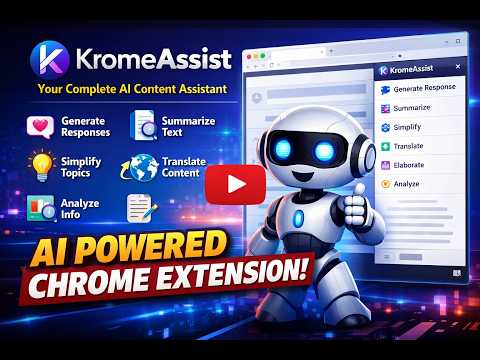
KromeAssist - Your Complete AI Content Assistant Transform how you interact with content online. KromeAssist is a powerful Chrome sidebar extension that uses OpenAI's GPT models to help you generate responses, summarize text, translate content, simplify complex topics, elaborate on ideas, and analyze information - all with a single click. KEY FEATURES 6 POWERFUL AI ACTIONS: 1. Response Generator Generate contextual, authentic responses to social media posts and messages. Perfect for: - Twitter/X replies (concise, under 280 characters) - LinkedIn professional engagement - Facebook conversations - Instagram comments - Reddit discussions - General messaging 2. Summarize Get clear, bullet-point summaries of any text. Great for: - Long articles and blog posts - Research papers and documents - Meeting notes and transcripts - Email threads 3. Simplify Break down complex topics into simple, easy-to-understand language with analogies and examples. Ideal for: - Technical documentation - Legal or medical text - Academic content - Explaining concepts to others 4. Elaborate Expand on ideas with detailed explanations, context, examples, and additional insights. Use for: - Fleshing out brief notes - Adding depth to summaries - Exploring topics further - Creating comprehensive explanations 5. Translate Accurate translations to 10 languages while preserving tone and meaning: - Spanish, French, German, Italian, Portuguese - Chinese (Simplified), Japanese, Korean - Arabic, Hindi 6. Analyze Get thoughtful analysis including themes, arguments, tone, effectiveness, and implications. Perfect for: - Content review - Argument evaluation - Writing feedback - Critical assessment IMAGE SUPPORT (Multimodal): - Upload images along with text for AI analysis - Describe what's in images - Analyze screenshots, charts, or graphics - Multiple image support QUICK ACCESS METHODS: - Floating Button: Select text anywhere and click the button that appears - Keyboard Shortcut: Cmd+Shift+G (Mac) or Ctrl+Shift+G (Windows/Linux) - Right-Click Menu: Context menu option for selected text - Sidebar Mode: Keep the extension open while browsing PLATFORM-SPECIFIC INTELLIGENCE (for Response action): - Twitter/X: Concise, engaging responses with relevant hashtags - LinkedIn: Professional, value-adding commentary - Facebook: Friendly, conversational engagement - Instagram: Casual, positive interactions with natural emoji use - Reddit: Informative, properly formatted contributions - General: Adaptable to any context CUSTOMIZABLE TONES: - Professional - For business and formal contexts - Casual - Relaxed, everyday conversation - Friendly - Warm and approachable - Enthusiastic - Energetic and positive - Thoughtful - Measured and considerate - Humorous - Light and witty SMART FEATURES: - Custom Instructions: Add specific guidance for any action (auto-saved per platform) - Platform Instructions: Customize default behaviors for each social network - History: Full history of all generations with search functionality - Token Tracking: See input/output tokens and estimated costs for each generation - Prompt Visibility: Review the exact prompts sent to the AI - Formatted Output: Markdown responses rendered beautifully with proper formatting - Auto-Save: Automatically save generations to history - Regenerate: Get alternative responses with one click HOW IT WORKS 1. Browse any website normally 2. Select text you want to work with (or upload an image) 3. Click the floating button, use keyboard shortcut, or open the sidebar 4. Choose your action (Respond, Summarize, Simplify, etc.) 5. Customize settings as needed (platform, tone, instructions) 6. Click "Generate" 7. Copy your beautifully formatted result HISTORY & TRACKING Every generation is saved with: - Full input and output text - Token usage (input, output, total) - Estimated API cost - Complete prompts used - Timestamp and action type - Search and filter capabilities PRIVACY & SECURITY - Your OpenAI API key is stored locally in your browser only - No data is sent to any third-party servers except OpenAI - No tracking, analytics, or data collection - You maintain full control over your API usage and costs - All preferences stored locally COST This extension requires an OpenAI API key (get one at platform.openai.com). Uses the cost-effective gpt-4o-mini model: - Typical cost: $0.001-0.003 per generation - You pay OpenAI directly based on your usage - Token tracking helps you monitor costs PERFECT FOR - Content Creators: Summarize research, elaborate on ideas, translate for global audiences - Social Media Managers: Generate platform-appropriate responses efficiently - Students & Researchers: Simplify complex texts, analyze arguments, summarize papers - Professionals: Maintain LinkedIn presence, craft thoughtful responses - Writers: Get feedback, expand outlines, translate content - Anyone: Save time understanding and creating content GETTING STARTED 1. Install the extension 2. Get an OpenAI API key from platform.openai.com 3. Click the extension icon to open the sidebar 4. Go to Settings and add your API key 5. Start selecting text and generating content! Transform how you read, write, and engage online with KromeAssist!
0 out of 5No ratings
Details
- Version2.1.0
- UpdatedMarch 22, 2026
- Size46.72KiB
- LanguagesEnglish
- Developer
Email
balu200529@gmail.com - Non-traderThis developer has not identified itself as a trader. For consumers in the European Union, please note that consumer rights do not apply to contracts between you and this developer.
Privacy

This developer declares that your data is
- Not being sold to third parties, outside of the approved use cases
- Not being used or transferred for purposes that are unrelated to the item's core functionality
- Not being used or transferred to determine creditworthiness or for lending purposes