

Image Downloader Pro
2 ratings
)
Overview
Find every image on a page. Save as ZIP, convert, resize or remove backgrounds, all on your computer.
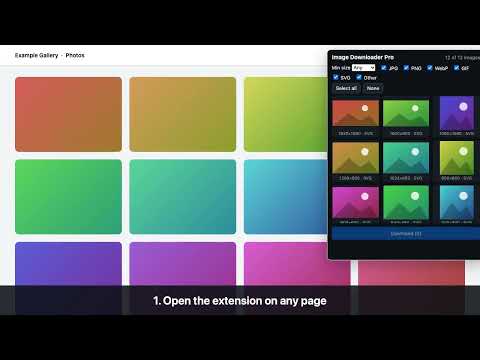
Image Downloader Pro scans the page you are on and shows every image in a thumbnail grid. Click the ones you want, then save them all at once. DOWNLOAD - Finds <img> tags (including the largest srcset version and lazy-loaded images), <picture> sources, CSS background images, SVG files, icons and og:image - "Load all images" scrolls the page for you, so images that load as you scroll are found too - Filter by minimum size and file type (JPG, PNG, WebP, GIF, SVG), select all or none - Saves with each image's original file name (or numbered names, your choice) - Download as one ZIP file CONVERT AND SHRINK - Convert to JPG, PNG or WebP - Resize to a maximum width and compress with a quality slider, handy for uploading to websites REMOVE BACKGROUND - Remove the background from selected images and save transparent PNGs, with a before/after preview - Works best on a single person or product against a plain background. Crowded scenes, hair and glass can be rough, so check the preview before saving. PRIVATE - No account, no tracking. Everything, including background removal, runs on your computer and nothing is uploaded. - ZIP, convert, resize and background removal ask for website access the first time you use them, so the extension can read the images you picked. Plain downloads need no extra access. If this saves you time, a coffee helps me keep improving it.
5 out of 52 ratings
Details
- Version1.2.0
- UpdatedNovember 16, 2026
- Offered byShahriar Mahmud Anik
- Size7.75MiB
- LanguagesEnglish
- Developer
Email
shahriarmahmud.anikk@gmail.com - Non-traderThis developer has not identified itself as a trader. For consumers in the European Union, please note that consumer rights do not apply to contracts between you and this developer.
Privacy

This developer declares that your data is
- Not being sold to third parties, outside of the approved use cases
- Not being used or transferred for purposes that are unrelated to the item's core functionality
- Not being used or transferred to determine creditworthiness or for lending purposes
Support
For help with questions, suggestions, or problems, visit the developer's support site