Item logo image for Koalendar: Free Appointment Scheduling

Koalendar: Free Appointment Scheduling

koalendar.com
Featured
4.9(

301 ratings

)
ExtensionTools10,000 users
Item media 5 (screenshot) for Koalendar: Free Appointment Scheduling
Item media 6 (screenshot) for Koalendar: Free Appointment Scheduling
Item video thumbnail
Item media 2 (screenshot) for Koalendar: Free Appointment Scheduling
Item media 3 (screenshot) for Koalendar: Free Appointment Scheduling
Item media 4 (screenshot) for Koalendar: Free Appointment Scheduling
Item media 5 (screenshot) for Koalendar: Free Appointment Scheduling
Item media 6 (screenshot) for Koalendar: Free Appointment Scheduling
Item video thumbnail
Item media 2 (screenshot) for Koalendar: Free Appointment Scheduling
Item video thumbnail
Item media 2 (screenshot) for Koalendar: Free Appointment Scheduling
Item media 3 (screenshot) for Koalendar: Free Appointment Scheduling
Item media 4 (screenshot) for Koalendar: Free Appointment Scheduling
Item media 5 (screenshot) for Koalendar: Free Appointment Scheduling
Item media 6 (screenshot) for Koalendar: Free Appointment Scheduling

Overview

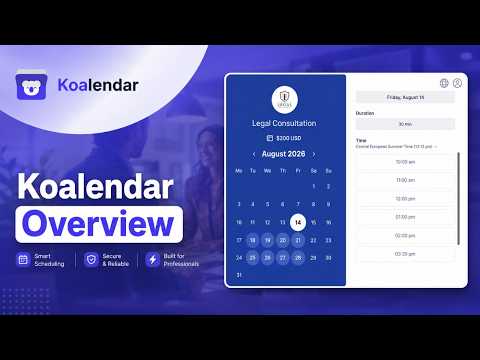
Schedule meetings with booking software. Share your availability, let clients book appointments, and sync with your calendar.

Top Features: ✅ Automatic Time Zone Detection: No confusion – clients always see availability in their local time. ✅ Calendar Sync: Seamlessly integrates with Google Calendar, Outlook, and Apple Calendar. ✅ Meeting Reminders: Reduce no-shows with automatic email reminders for you and your clients. ✅ Video Conferencing Integration: Auto-generate Zoom and Google Meet links for virtual meetings. ✅ Payment Collection: Accept payments via Stripe directly during the booking process. ✅ Customizable Booking Pages: Personalize your scheduling page with branding, colors, and meeting types. ✅ Quick Share from Extension: Access all your booking pages and share links instantly from Chrome. ✅ Unlimited Free Bookings: Create unlimited scheduling pages and receive unlimited appointments at no cost. 🗓️ Koalendar is an incredibly user-friendly online scheduling tool designed to help small business owners make an appointment system that works seamlessly. Perfect for: • Consultants, Tutors and Coaches • Sales Teams and Account Managers • Freelancers and Service Providers • Recruiters and HR Professionals • Customer Support Teams • Anyone scheduling client meetings regularly How to Use: 1. Install the Koalendar Chrome Extension. 2. Sign up for free and create your booking page. 3. Enter your Koalendar email in the extension popup. 4. Share your booking link directly from the extension. FAQs: Q: Is Koalendar free to use? A: Yes! Koalendar offers a free plan with unlimited bookings and calendar connections. You can upgrade to the PRO plan for advanced features like custom branding, team scheduling, booking payments, and additional integrations. Q: Which calendars does Koalendar integrate with? A: Koalendar seamlessly integrates with Google Calendar, Outlook, Apple and other popular platforms. All your bookings sync automatically to prevent double-bookings and keep your schedule up-to-date. You can connect as many calendars as you want. Q: Can I customize my booking page? A: Absolutely! Customize your booking page with your branding, colors, logo, and personalized meeting types. Set your availability preferences, buffer times, and meeting durations to match your workflow. Q: Who is Koalendar best suited for? Koalendar is best suited for individual professionals and small teams that need a simple, reliable way to manage appointments without paying for features they don’t use. It’s commonly used by freelancers, consultants, coaches, educators, service businesses, and small teams who want to share availability, avoid back-and-forth emails, and keep multiple calendars in sync. For more information, visit our website: https://koalendar.com Stop the back-and-forth emails and start scheduling smarter! Install Koalendar now and let clients book meetings with you instantly.

Details

  • Version
    2.2.0
  • Updated
    January 26, 2026
  • Size
    2.17MiB
  • Languages
    42 languages
  • Developer
    Website
    Email
    support@koalendar.com
  • Non-trader
    This developer has not identified itself as a trader. For consumers in the European Union, please note that consumer rights do not apply to contracts between you and this developer.

Privacy

Manage extensions and learn how they're being used in your organization
The developer has disclosed that it will not collect or use your data.

This developer declares that your data is

  • Not being sold to third parties, outside of the approved use cases
  • Not being used or transferred for purposes that are unrelated to the item's core functionality
  • Not being used or transferred to determine creditworthiness or for lending purposes

Support

For help with questions, suggestions, or problems, visit the developer's support site

Related

Button for Google Calendar

4.1

Check Google Calendar schedule and join meetings with one click. It fully integrates with Zoom, Google Meet, Microsoft Teams, etc.

Checker Plus for Google Calendar™

4.4

See your next events, get meeting notifications and snooze events without opening the Google Calendar page!

Manganum: Sidebar with Gmail and Google Calendar

4.3

One-click access to your tools, even Gmail and Google Calendar.

GCalPlus

3.9

Extra Options for Google Calendar

Google Calendar™ on new Tab

4.8

Displays your Calendar's weekly, or monthly schedules and agenda on new tabs

Calendly: Meeting Scheduling Software

4.3

Schedule meetings without the hassle. Never get double booked. Calendly works with your calendar to automate appointment scheduling.

Meeting Scheduler for Gmail™ by cloudHQ

4.5

Easy meeting scheduling and meeting invitations directly from your mailbox

Tags for Google Calendar™

4.0

A little visual addon that adds special markup to tags and question marks in event names.

Calendar New Tab

4.8

Live wallpapers, Google Calendar, Tasks, ChatGPT, Gmail

Appointment Reminder | Google Calendar

4.9

SMS Appointment Reminders For Google Calendar

Planyway for Trello: Calendar, Timeline, Time Tracking and Reports

4.6

Google Calendar & Outlook 2-way sync, roadmap, project plan, Gantt chart, time tracker, reports, weekly planner, project management

Fellow: AI Meeting Notes, Agendas, and Action items

4.8

Get AI Meeting Notes, Transcripts, AI Action Items and Summaries in Google Meet and Google Calendar

Button for Google Calendar

4.1

Check Google Calendar schedule and join meetings with one click. It fully integrates with Zoom, Google Meet, Microsoft Teams, etc.

Checker Plus for Google Calendar™

4.4

See your next events, get meeting notifications and snooze events without opening the Google Calendar page!

Manganum: Sidebar with Gmail and Google Calendar

4.3

One-click access to your tools, even Gmail and Google Calendar.

GCalPlus

3.9

Extra Options for Google Calendar

Google Calendar™ on new Tab

4.8

Displays your Calendar's weekly, or monthly schedules and agenda on new tabs

Calendly: Meeting Scheduling Software

4.3

Schedule meetings without the hassle. Never get double booked. Calendly works with your calendar to automate appointment scheduling.

Meeting Scheduler for Gmail™ by cloudHQ

4.5

Easy meeting scheduling and meeting invitations directly from your mailbox

Tags for Google Calendar™

4.0

A little visual addon that adds special markup to tags and question marks in event names.

Google apps