


Overview
One-click on-page SEO audit: SEO score, meta tags, schema, Core Web Vitals, SERP preview, links and images. Free.
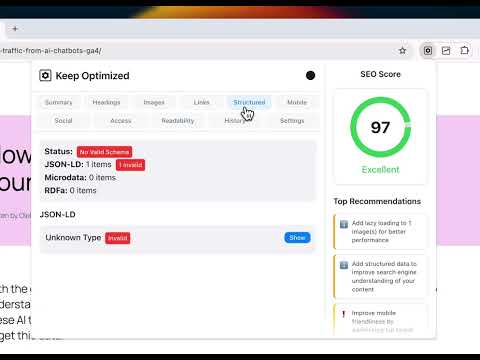
Keep Optimized is a one-click, on-page SEO checker for Chrome. Open any page, click the icon, and get a full on-page SEO audit right in your browser: an SEO score, prioritised fixes, and a click-to-highlight inspector that jumps you straight to the element that needs work. No account. No sign-up. The audit runs on the page in front of you, and the results are clear enough to act on without opening five other tools. Built for SEO specialists, content writers, marketers, and site owners who want answers fast. ONE CLICK, FULL PAGE AUDIT - SEO score with a category breakdown: title, description, headings, content, images, links, technical - Prioritised recommendations sorted by impact, not a flat checklist - Two-pane issue inspector: click any recommendation to scroll to and highlight the exact element on the live page - Open it as a toolbar popup, or dock it in Chrome's side panel and keep it open while you browse - Re-checks automatically when the page changes (or switch to manual mode) META TAGS, TITLES AND SERP PREVIEW - Title and meta description length plus real pixel-width checks, so you catch truncation before Google does - Desktop and mobile SERP preview with accurate pixel truncation and a breadcrumb path - Open Graph and X (Twitter) card analysis for clean social sharing - Canonical, meta robots, charset and hreflang validation HEADINGS AND READABILITY - Full H1 to H6 hierarchy with skipped-level and multiple-H1 checks - Empty, hidden and below-the-fold heading detection - Readability scoring (sentence length, grade level) with language-aware handling - Inline search across every heading on the page STRUCTURED DATA (SCHEMA) VALIDATION - Parses and validates JSON-LD per Schema.org type: Article, Product, FAQPage, BreadcrumbList, Organization, LocalBusiness, Recipe, Event, VideoObject and more - Flags missing required and recommended fields for each type - Suggests schema types your page looks eligible for but is missing - Microdata and RDFa detection, shown in a progressive tree view TECHNICAL SEO THAT MOST EXTENSIONS SKIP - Rendered vs raw HTML diff: see what Googlebot gets before JavaScript runs versus what the user sees, so client-side rendering gaps stop hiding from you - Response headers inspector: X-Robots-Tag, Content-Type, cache controls, HSTS and other security headers, plus HTTP status - Google index check using the site: operator - Content freshness: published and modified dates pulled from meta tags, JSON-LD and the Last-Modified header, with stale-content flags CORE WEB VITALS - LCP, CLS, INP, FCP and TTFB captured from the real page load - LCP element and likely LCP image called out, with fetchpriority and lazy-loading warnings that protect your largest paint IMAGES - Missing or empty alt text - Missing width and height (layout-shift / CLS risk) - Oversized images, missing srcset, and modern-format (WebP / AVIF) adoption rate - Above-the-fold lazy-loading warning on your likely LCP image LINKS - Internal, external, broken and nofollow classification - On-demand HTTP link verification that checks real status codes - Generic anchor text, unsafe target=_blank, mixed-content and javascript: link checks MOBILE AND ACCESSIBILITY - Viewport, responsive width and 48px tap-target checks - lang attribute, ARIA roles, form labels and keyboard-focus checks that overlap with SEO and UX KEYWORD PLACEMENT - Enter a target keyword and see exactly where it appears: title, H1, H2, H3, URL slug, meta description, first paragraph and image alt - Placement coverage score and prominence in the content - Keyword frequency is shown for reference only, not treated as a ranking signal EXPORT AND SHARE - Copy the full report as Markdown to paste into a doc, a ticket, or an LLM - Export as JSON, CSV or Markdown - Local history of recently audited pages PRIVATE BY DESIGN - No accounts, no analytics, no telemetry - Keep Optimized has no backend server of its own, so it never sends your audit data to us - The only network requests are to the page you are auditing (to compare raw vs rendered HTML and read response headers), on-demand link checks you trigger, and a Google index lookup - Built on Manifest V3 WHY THE PERMISSIONS - activeTab and scripting: read and analyse the page you are actively auditing - storage: save your settings, history and the latest analysis locally - sidePanel: open the audit in Chrome's side panel - host access: fetch the raw server HTML and response headers for the same URL you are auditing WHO IT IS FOR - SEO specialists running quick on-page audits across many pages - Content writers and editors checking a draft before it ships - Developers validating schema, response headers and JavaScript rendering - Site owners who want a clear, plain-language SEO check FREQUENTLY ASKED QUESTIONS Q: Is Keep Optimized free? A: Yes. Keep Optimized is free, with no account, sign-up or trial. Q: What does Keep Optimized check? A: It runs a full on-page SEO audit: title and meta tags, headings, structured data (schema), Core Web Vitals, internal and external links, images, mobile-friendliness, canonical, robots and hreflang, readability, and content freshness. Q: Do I need an account or a login? A: No. Click the icon on any page and the audit runs in your browser. Q: Is my data private? A: Keep Optimized has no backend of its own and never sends your audit data to us. The only network requests are to the page you are auditing, on-demand link checks you trigger, and a Google index lookup. Q: Does it validate schema and structured data? A: Yes. It parses JSON-LD and checks required and recommended fields per Schema.org type, and suggests schema types your page is missing. Q: Can I export or share the report? A: Yes. Copy it as Markdown to paste into a doc, a ticket or an LLM, or export JSON, CSV or Markdown. Q: Does it work in the Chrome side panel? A: Yes. Open the audit as a toolbar popup or dock it in Chrome's side panel and keep it open while you browse. Q: Who is Keep Optimized for? A: SEO specialists, content writers, marketers and developers who want a fast, private on-page SEO check. Keep Optimized is a free Chrome SEO extension for fast, private, on-page SEO audits and technical SEO checks. Install it, pin it, and check any page in one click. Questions or feedback: k-o.pro
5 out of 53 ratings
Details
- Version3.1
- UpdatedJuly 17, 2026
- Size213KiB
- LanguagesEnglish
- DeveloperWebsite
Email
hi@k-o.pro - Non-traderThis developer has not identified itself as a trader. For consumers in the European Union, please note that consumer rights do not apply to contracts between you and this developer.
Privacy

This developer declares that your data is
- Not being sold to third parties, outside of the approved use cases
- Not being used or transferred for purposes that are unrelated to the item's core functionality
- Not being used or transferred to determine creditworthiness or for lending purposes
Support
For help with questions, suggestions, or problems, visit the developer's support site