

LinkCollect - Save & Share Bookmarks

Visão geral
linkcollect is the simplest way to save & share web links, bookmarks or tabs from anywhere to anyone
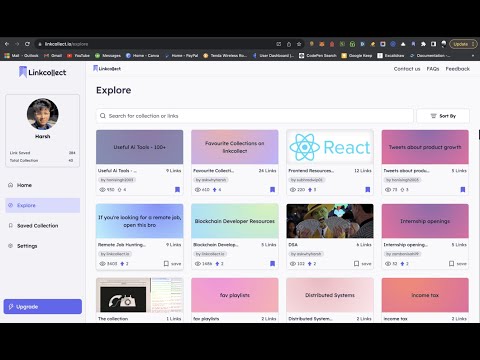
A tool to help you save, collect and share links and resource bundles with your friends faster and easier. We help you create folders of links and share with your friends, Save all your tab groups simply with just a right click 🤩 or commands (ALT + C) or (Alt +A). You can also use ALT + W to open the extension without doing anything ✅ Use our browser extension on any browser to save any link to your collection with just a right click on the page to save ✅ or a command (Alt + C) ✅ we create a shareable link instantly so you can share your bookmarks with your friends super fast ⚡️ ✅ Use our commands and key shortcuts anywhere on your browser to save your time, do things that matters instead 👀 , Try ALT + A to save all open tabs in seconds. Copy the link and share it with anyone, see how many people saw it in the dashboard, edit it to add notes and change anything about it ✅ Use right click select and save all links in the selection in one click ✅Linkcollect will help you do following in very simple and easy way: 🔒For Private Use (in extension) - Save all of your tabs as session so you can reopen them later - Save bookmarks in folders or collections, and share them with anyone - Search across bookmarks, add notes to your bookmarks and search with notes - Access them anywhere by just logging in to you account on pc, multiple logins from same accounts are also supported - Use right click to select and save all links in the selection in one click, share it aith anyone by making it public 🪄In Dashboard - Explore collections created by other users, Save and duplicate collections you found in explore page, to your personal account - Search on linkcollect for learning resources or any thing you might be looking for, profile of users discover the most viewed collections. - Share your linkcollect profile, just like you share any other social, so people can checkout your links and collections (public ones) easily. Coming Soon - add reminders to your bookmarks while you save it, so you don’t forget it later Never Forget a Link Again
4,1 de 517 notas
Detalhes
- Versão1.1.3
- Atualização12 de outubro de 2023
- Tamanho1.49MiB
- IdiomasEnglish
- DesenvolvedorLinkCollectWebsite
Borade Vasti Rd Sector 10, MIDC, Bhosari Pimpri-Chinchwad, Maharashtra 412105 INE-mail
linkcollect.io@gmail.com - Não negocianteEsse desenvolvedor não se identificou como comerciante. Caso você seja da União Europeia, observe que os direitos do consumidor não se aplicam a contratos firmados entre você e esse desenvolvedor.
Privacidade

LinkCollect - Save & Share Bookmarks divulgou as informações a seguir sobre a coleta e o uso dos seus dados. Para mais detalhes, consulte estas informações do desenvolvedor: privacy policy.
LinkCollect - Save & Share Bookmarks processa o seguinte:
O desenvolvedor declara que seus dados
- Não são vendidos a terceiros, exceto nos casos de uso aprovados
- Não são usados ou transferidos para fins não relacionados à função principal do item
- Não são usados ou transferidos para informações de crédito ou empréstimo
Suporte
Para receber ajuda com perguntas, sugestões ou problemas, abra esta página no seu navegador para computador