

Email Color for Gmail™

Overview
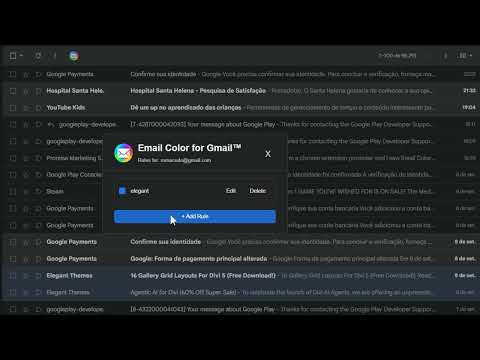
Highlight important senders with color rules in Gmail.
Make important emails stand out with color. Email Color lets you create simple color rules for Gmail senders. Highlight messages from a specific email address, domain, company, newsletter, or anything else you want to spot quickly in a busy inbox. Just create a rule, choose a color, and Email Color will automatically highlight matching messages directly in your Gmail inbox. Simple and private • Create color rules using full or partial email addresses • Choose a different color for each rule • Highlight messages automatically as you browse Gmail • Keep separate rules for different Gmail accounts • Everything is stored locally on your device • No analytics, tracking, external servers, or data collection Why I built Email Color I built Email Color to help me navigate a busy inbox with ADHD. Color helps me spot what matters at a glance, and I decided to share the tool in the hope that it might help others too. Email Color is designed to do one simple thing: make the emails that matter to you easier to see.
0 out of 5No ratings
Details
- Version0.1.0.1
- UpdatedSeptember 12, 2026
- Offered byBlueCodeAcademy.com
- Size60.08KiB
- LanguagesEnglish
- Developer
Email
mmacedo@gmail.com - Non-traderThis developer has not identified itself as a trader. For consumers in the European Union, please note that consumer rights do not apply to contracts between you and this developer.
Privacy

This developer declares that your data is
- Not being sold to third parties, outside of the approved use cases
- Not being used or transferred for purposes that are unrelated to the item's core functionality
- Not being used or transferred to determine creditworthiness or for lending purposes