

Ctrl+FLASH

Overview
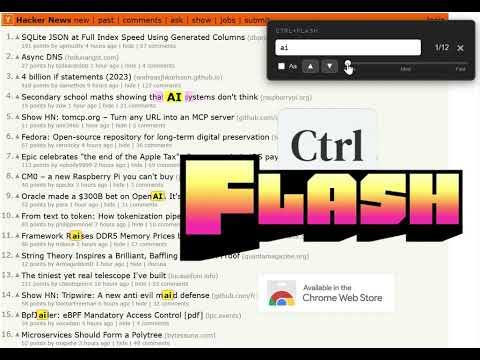
Replaces standard Ctrl+F with a disco-mode pulsating search.
Stop squinting. Start flashing! Replace your boring Ctrl+F with a high-visibility, flashing search tool. You hit Ctrl+F. You type a word. You squint at the screen trying to find that one tiny yellow highlight hidden in a sea of text. We fixed that. 🔍 Ctrl+FLASH replaces your browser’s default find bar with an impossible-to-miss flashing, pulsing highlight. Whether you're power-scrolling through documentation, hunting for a keyword in a massive article, or just tired of losing track of your search terms, Ctrl+FLASH makes sure you never miss a match again. ⌨️ Supports case-sensitivity as well as keyboard up/down arrows. 🚨 Control the flash! Choose from 3 flash speeds. 🔒 Ctrl+FLASH runs entirely on your device. We don't track your searches, we don't read your history, and we don't send data to servers. Period. PDFs not currently supported. IMPORTANT SAFETY WARNING: This extension generates rapidly flashing colors and lights. A small percentage of individuals may experience epileptic seizures when exposed to certain light patterns. If you have a history of epilepsy or seizures, please consult a doctor before use.
0 out of 5No ratings
Details
- Version1.3
- UpdatedDecember 16, 2025
- Offered byKLWellington
- Size23.05KiB
- LanguagesEnglish (United States)
- Developer
Email
klwellington@gmail.com - Non-traderThis developer has not identified itself as a trader. For consumers in the European Union, please note that consumer rights do not apply to contracts between you and this developer.
Privacy

This developer declares that your data is
- Not being sold to third parties, outside of the approved use cases
- Not being used or transferred for purposes that are unrelated to the item's core functionality
- Not being used or transferred to determine creditworthiness or for lending purposes