


Overview
Conecta o Klix ao DevTools do browser
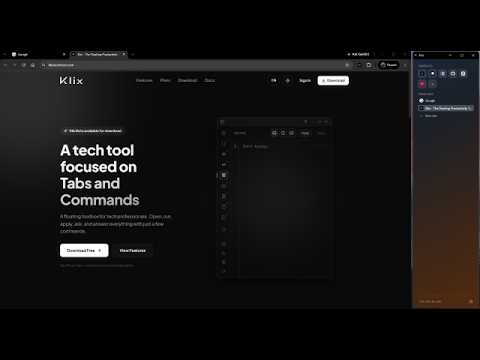
Connects Klix to the browser DevTools Your tabs and favorites in a sidebar that splits the screen with the browser — docked to the side, without covering the page. You choose the width, the side, and whether it opens together with Chrome. FAVORITES THAT ARE PLACES, NOT SHORTCUTS Each favorite is tied to a tab. Clicking returns to exactly where you left off, even after you have navigated to another page of the site — not to the home page. If the tab was closed, the next click reopens it from scratch. Drag open tabs to favorites, reorder by dragging, and drag back to the list when you want to unfavorite. THE TAB LIST SHOWS WHAT'S HAPPENING • Local servers get a marker, with the port in the tooltip. It recognizes localhost, *.localhost subdomains, 127.x.x.x, [::1], and 0.0.0.0. • Tabs playing sound display a clickable speaker — mute and unmute on the row itself, without switching tabs. • Tabs using a microphone or camera are marked, even when the capture runs inside an iframe, as in most video calls. • Chrome tab groups appear with the color and name you set. • GitHub pull request tabs are grouped automatically. • Your public IP is in the footer — one click copies it. TWO WAYS TO DISPLAY • Native panel: anchored by Chrome, never falls behind anything. The browser defines the side and minimum width. • Split window: its own window docked beside the browser. Any width, left or right, and option to open together with Chrome. Dragging the edge resizes both together; closing returns the space. APPEARANCE Seven background colors chosen not to clash with the text, plus an animated gradient. The font tone follows the background automatically, so no combination becomes illegible. DEVTOOLS BRIDGE (REQUIRES THE KLIX APP) If you use the Klix app, Ctrl+Shift+X attaches the debugger to the active tab and mirrors console, network requests, DOM, and CSS to the app running on your machine. From there you can edit HTML and CSS live, inject styles, evaluate JavaScript, and simulate network conditions. The sidebar works on its own. This part is the only one that depends on the Klix app. AFTER INSTALLING, CHECK THE SHORTCUTS Klix already comes with Ctrl+Shift+L to open the sidebar and Ctrl+Shift+X for the DevTools bridge (on Mac, Command instead of Ctrl). If another extension already uses one of these combinations, Chrome leaves Klix's shortcut blank without warning. To check or change: 1. Copy chrome://extensions/shortcuts and paste it into the address bar — chrome:// links are not clickable. 2. Look for Klix Tech Tool in the list. 3. Click the shortcut field and press the desired combination. From the extension: gear icon at the bottom of the sidebar, Shortcuts section, button "Edit shortcuts in Chrome". This screen shows the currently active shortcut, or "Not set" if it is blank. LANGUAGES Brazilian Portuguese, English, and Spanish, following the browser language.
5 out of 51 rating
Details
- Version1.1.0
- UpdatedSeptember 16, 2026
- Size71.18KiB
- Languages3 languages
- DeveloperWebsite
Email
leonardowert@gmail.com - Non-traderThis developer has not identified itself as a trader. For consumers in the European Union, please note that consumer rights do not apply to contracts between you and this developer.
Privacy

This developer declares that your data is
- Not being sold to third parties, outside of the approved use cases
- Not being used or transferred for purposes that are unrelated to the item's core functionality
- Not being used or transferred to determine creditworthiness or for lending purposes