

Kite by Zerodha CSV Support
평점 18개
)
개요
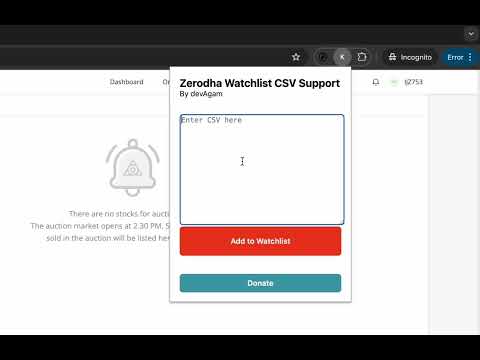
Add stock symbols from CSV in your Kite Watchlist
Kite by Zerodha CSV Support 🚀 Effortlessly add multiple stock symbols on kite.zerodha.com with just a single click of a button. This tool simplifies the process of adding a list of stock symbols, using a CSV. This feature has long been delayed by the Kite team, so it was about time I added support for it. Key Features: - Bulk Add 📋: Paste a CSV list of stock symbols directly into the extension, click the add button, and it will automatically add each symbol to your Watchlist. - Seamless Integration 🔗: The extension works with all my other extensions, Screener to TradingView and Chartink to TradingView. - TradingView Limitation Bypass 🚫📈: This would also help increase the limit for people who cannot afford TradingView premium by technically increasing your limit to 100 stocks. ccc - Date Prefix Handling 🗓️: Automatically preprocesses input to remove any date prefixes that might be included in your CSV data (particularly for the text supplied by my extension Chartink to TradingView). How It Works: 1. Copy 📄: Copy your CSV list of stock symbols (e.g., NSE:JYOTICNC, NSE:ADANIENT). 2. Launch the Extension 🖱️: Click on the extension icon in your browser. 3. Paste and Add ➕: Paste the CSV list into the provided text area and click the add button. The extension will sequentially search each symbol in the Kite watchlist, saving you time and effort. Did this extension save you time? If your answer is yes, feel free to buy me a ☕️ cutting chai below. https://agamjot.ca/donate Install Kite Zerodha CSV Search today and streamline your stock research process on kite.zerodha.com! 📈🔍
5점 만점에 4점평점 18개
세부정보
- 버전1.0
- 업데이트됨2024년 7월 10일
- 제공devagamjot
- 크기6.44KiB
- 언어English
- 개발자
이메일
devagamjot@gmail.com - 비판매자판매자로 식별되지 않은 개발자입니다. 유럽 연합에 거주하는 소비자의 경우, 이 개발자와 체결한 계약에 대해서는 소비자 권리가 적용되지 않을 수 있음을 유의해야 합니다.
개인정보 보호

개발자가 사용자 데이터에 관해 다음과 같이 선언했습니다
- 승인된 사용 사례를 제외하고 서드 파티에 판매하지 않음
- 항목의 핵심 기능과 관련 없는 목적으로 사용하거나 전송하지 않음
- 신용도 판단 또는 대출 목적으로 사용하거나 전송하지 않음