Item logo image for KioskKast

KioskKast

Item media 2 (screenshot) for KioskKast
Item video thumbnail
Item media 2 (screenshot) for KioskKast
Item video thumbnail
Item media 2 (screenshot) for KioskKast

Overview

Control KioskKast tablets for interactive displays and presentations

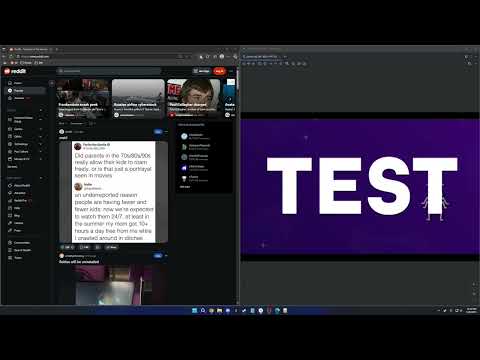
Transform any tablet into a wireless display with KioskKast! KioskKast lets you instantly stream content from your computer to Android tablets on your local network - perfect for digital signage, presentations, retail displays, or interactive kiosks. What KioskKast does: Automatic Discovery - Finds all KioskKast-enabled tablets on your network in seconds Screen Mirroring - Stream your entire screen, specific windows, or browser tabs to tablets wirelessly Web Content Sharing - Send any webpage directly to tablets for native display Remote Control - Control tablet content with your mouse and keyboard from your PC Multi-Tablet Support - Manage multiple tablets and switch between them easily Perfect for: ✓ Retail & Restaurants - Update menu boards and promotional displays instantly ✓ Offices - Turn tablets into wireless presentation screens or information displays ✓ Education - Share content to tablet stations in classrooms ✓ Events - Create dynamic information kiosks or wayfinding displays ✓ Home - Use old tablets as smart displays or digital photo frames Why choose KioskKast: No cables needed - Everything works over your WiFi network Use existing tablets - Repurpose any Android tablet (requires KioskKast app) Simple setup - Connect in 3 clicks: discover, select, stream Local & secure - All communication stays on your local network Real-time streaming - Low-latency WebRTC technology for smooth presentations How it works: Install this extension and the KioskKast app on your Android tablets Click the extension icon to discover tablets on your network Select a tablet and choose to mirror your screen or share a webpage Control everything from your computer - it's that easy!

Details

  • Version
    1.1.0
  • Updated
    November 5, 2025
  • Offered by
    harusoul
  • Size
    59.43KiB
  • Languages
    English (United States)
  • Developer
    Email
    dev@kioskkast.com
  • Non-trader
    This developer has not identified itself as a trader. For consumers in the European Union, please note that consumer rights do not apply to contracts between you and this developer.

Privacy

The developer has disclosed that it will not collect or use your data. To learn more, see the developer’s privacy policy.

This developer declares that your data is

  • Not being sold to third parties, outside of the approved use cases
  • Not being used or transferred for purposes that are unrelated to the item's core functionality
  • Not being used or transferred to determine creditworthiness or for lending purposes

Related

Display Router – Multi Screen & Monitor Manager

5.0

Open any web page in full-screen mode on your selected monitor

VIA Screen Share

3.2

Share your desktop or application using VIA Screen Share [Minimum VIA Version 2.5]

Wine online for Winapps

4.5

Run win-application software and win-computer games with a Wine online platform

No on TV

5.0

Disables the 'Play on TV' button to help prevent accidental casting to your TV.

Remote Control for TV

2.3

Remote control your Roku smart TV from Chrome; enhance your Roku experience, so intuitive and simple to use!

Epson iProjection Extension

2.0

This extension allows you to mirror your Chromebook's screen to an Epson projector when used with the Epson iProjection app.

Oversized Monitor Guru (OMG)

5.0

Transform your large monitor into a professional screen sharing experience!

PeerScreen

5.0

Share your screen with other users using WebRTC and PeerJS.

sidetok

0.0

A chrome extension for working with TikTok on chrome side panel

Duplicate Browser Screen

4.3

Duplicate a window, screen, or browser tab using Chrome's picker (window preselected). Includes zoom, pan, and utility options.

Screen Capture Recorder 4K

3.8

Capture and record your screen in high-quality 4K resolution with ease. Become a KOFIKLUB Member Today!

LightCast Sender

3.6

Mirror your device to any computer screen any time

Display Router – Multi Screen & Monitor Manager

5.0

Open any web page in full-screen mode on your selected monitor

VIA Screen Share

3.2

Share your desktop or application using VIA Screen Share [Minimum VIA Version 2.5]

Wine online for Winapps

4.5

Run win-application software and win-computer games with a Wine online platform

No on TV

5.0

Disables the 'Play on TV' button to help prevent accidental casting to your TV.

Remote Control for TV

2.3

Remote control your Roku smart TV from Chrome; enhance your Roku experience, so intuitive and simple to use!

Epson iProjection Extension

2.0

This extension allows you to mirror your Chromebook's screen to an Epson projector when used with the Epson iProjection app.

Oversized Monitor Guru (OMG)

5.0

Transform your large monitor into a professional screen sharing experience!

PeerScreen

5.0

Share your screen with other users using WebRTC and PeerJS.

Google apps