


Overview
Fixes Kinetic grid bugs; adds auto-size columns, full-width mode, scroll buffer, theming, and spacing. Default OFF.
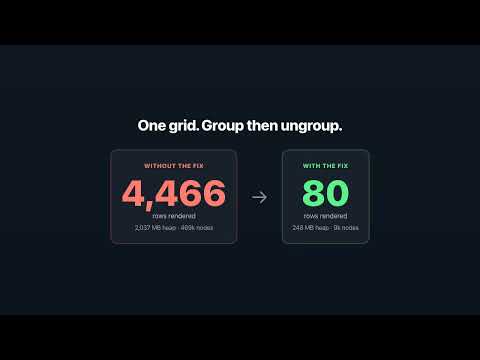
Kinetic Grid Grouping Fix repairs a memory leak in Epicor Kinetic (epicorsaas.com) data grids. After you group a large grid by several columns and then ungroup it, the grid stops windowing and re-renders every row into the page — on a ~4,400-row grid that balloons the tab to ~2 GB of heap and ~470,000 DOM nodes, making the browser sluggish or crashing the tab. The extension applies a small, targeted patch to Kinetic's own grid code so that ungrouping restores the normal virtual-scroll window. With the fix on, the same group→ungroup cycle stays at ~80 rendered rows and a few hundred MB of heap. It also fixes a second grid bug: after loading a large set of records into a grid through the search dialog (Download Records → Get More → Select All → OK), the grid can render blank — the rows are loaded but scrolled out of view — until you manually scroll. The fix detects that misalignment and nudges the grid back into view automatically, and never interferes with a grid you are actively scrolling. And a third: in grids with checkbox (yes/no) columns, grouping then ungrouping can leave some checkboxes rendered at a different size or alignment than the rest of the column. The fix pins every checkbox in a column back to that column's own normal look, so they stay consistent. On a correctly rendered grid it changes nothing. HOW IT WORKS • The fix is OFF by default. Nothing changes until you open the toolbar popup and flip the toggle on, then reload your Kinetic tab. • It only runs on epicorsaas.com. It does not touch any other website. • It collects no data and sends nothing off your device. NOTE ON THE DEBUGGER BANNER In the default delivery mode, Chrome shows an "extension is debugging this browser" banner while the fix is ON. That is expected — the extension uses Chrome's debugger API only to rewrite Kinetic's script as it loads, and only on epicorsaas.com tabs. Turn the toggle off and the banner disappears. This is an independent, unofficial fix and is not affiliated with or endorsed by Epicor. "Epicor" and "Kinetic" are trademarks of Epicor Software Corporation.
5 out of 51 rating
Details
- Version3.25.0
- UpdatedJune 11, 2026
- Size136KiB
- LanguagesEnglish (United States)
- Developer
- Non-traderThis developer has not identified itself as a trader. For consumers in the European Union, please note that consumer rights do not apply to contracts between you and this developer.
Privacy

This developer declares that your data is
- Not being sold to third parties, outside of the approved use cases
- Not being used or transferred for purposes that are unrelated to the item's core functionality
- Not being used or transferred to determine creditworthiness or for lending purposes
Support
For help with questions, suggestions, or problems, visit the developer's support site