

Kindle Text Extractor & OCR - TextMuncher

Overview
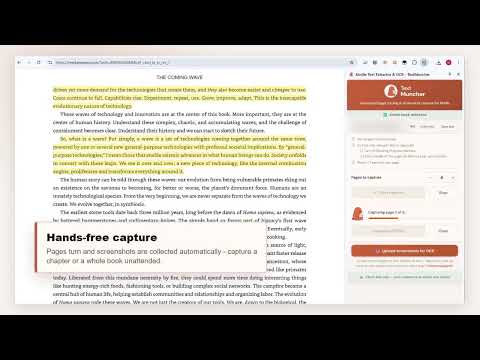
Extract Kindle text: capture pages hands-free in Kindle for Web, OCR them on our site, then use the text in AI tools or your docs.
EXTRACT TEXT FROM KINDLE BOOKS — AUTOMATED TextMuncher turns books you open in Kindle Cloud Reader into clean, editable text: the extension automatically turns pages and captures screenshots, then the web app converts them with OCR. In Speed mode — the default — processing stays on your device; optional Pro Quality mode sends hard-to-read pages for a cloud second pass. The reader blocks copy-paste and may stop you mid-chapter. Manual screenshots take hours. TextMuncher automates the painful parts — page-turning, capture, and image-to-text conversion — so you can actually use the books you own. HOW IT WORKS 1. Open your book to the chapter or page where you want to start — regional reader sites are supported 2. Click Start — TextMuncher turns the pages and captures the screenshots, hands-free 3. Upload the screenshots to textmuncher.com for OCR — or feed them straight to your AI tool, whatever workflow you're aiming for 4. Copy clean, editable text — done KEY FEATURES ✓ Hands-free automation — no page-by-page screenshotting ✓ Clean OCR text from captured pages ✓ Privacy-first — Speed mode OCR runs in your browser by default; optional Pro Quality mode uses a cloud second pass ✓ EPUB to text converter — drag an EPUB into the web app and get clean text ✓ Works with books you own that open in Kindle for Web ✓ Export your captured pages as a ZIP USE YOUR CAPTURED TEXT Turn assigned reading into study guides and flashcards, build searchable book notes, or collect passages for citation work and literature reviews. Check quotations against the source, then save the result as plain text for the tools you already use. BUILT FOR REAL READING WORK Students, researchers, and serious readers use TextMuncher when copy-paste restrictions interrupt study, writing, or note-taking. PRICING Free: 30 automated capture pages + unlimited manual image-to-text uploads (free account required) Pro: $9.99/month or $48/year — unlimited pages TextMuncher respects copyright — only use it with eBooks you legally own or have permission to access. TextMuncher does not decrypt files or alter your books; it captures pages you can already see on screen and processes them locally by default. TextMuncher is an independent tool and is not affiliated with or endorsed by Amazon. PRIVACY POLICY: https://textmuncher.com/privacy SUPPORT: https://textmuncher.com/contact
4.6 out of 59 ratings
Details
- Version2.0.3
- UpdatedOctober 1, 2026
- FeaturesOffers in-app purchases
- Size532KiB
- Languages8 languages
- DeveloperPolymath Studios LLCWebsite
306 W Redwood St #4568 Baltimore, MD 21201-1708 USEmail
michael.yan23@gmail.comPhone
+1 443-384-7406 - TraderThis developer has identified itself as a trader per the definition from the European Union and committed to only offer products or services that comply with EU laws.
- D-U-N-S147823275
Privacy

Kindle Text Extractor & OCR - TextMuncher has disclosed the following information regarding the collection and usage of your data. More detailed information can be found in the developer's privacy policy.
Kindle Text Extractor & OCR - TextMuncher handles the following:
This developer declares that your data is
- Not being sold to third parties, outside of the approved use cases
- Not being used or transferred for purposes that are unrelated to the item's core functionality
- Not being used or transferred to determine creditworthiness or for lending purposes
Support
For help with questions, suggestions, or problems, visit the developer's support site