

StorageDump

Overview
Inspect and export cookies, localStorage, sessionStorage, IndexedDB and Cache API for any site you visit.
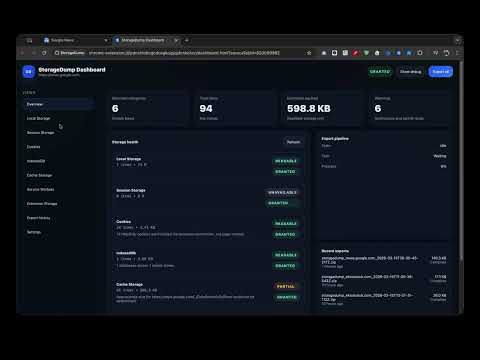
StorageDump shows you, in one place, what the site in your current tab has saved in your browser: its cookies, local and session storage, IndexedDB databases, cached files and service workers. You can look through it, change or remove entries, and save a complete copy to a file. How it works Open the site, click the StorageDump icon and press Scan. You get a summary of what the site uses. Press Export all to save a ZIP or JSON file to your Downloads folder, or open the dashboard to browse each part in detail. What you can do - Review a site's data in a full-page dashboard, down to individual database records. - Edit or delete entries to test how a site behaves with different data. - Save an exact copy: values are written as stored, and large exports are split automatically. - Include cookies that page scripts cannot see, such as HttpOnly cookies. - Hide values that look like passwords or tokens before you share an export. - Keep a short history of your exports with a checksum for each file. Who it is for Web developers debugging their own apps, QA engineers capturing test state, and anyone checking what a site keeps after logging out or clearing consent. Privacy StorageDump reads a site only when you press Scan or Export; nothing is read in the background. There is no server, no account and no analytics. Exported files go only to your Downloads folder. The source code is open (MIT) on GitHub.
0 out of 5No ratings
Details
- Version0.2.1
- UpdatedOctober 30, 2026
- Offered byns0bj
- Size119KiB
- LanguagesEnglish
- Developer
Email
telepenu@gmail.com - Non-traderThis developer has not identified itself as a trader. For consumers in the European Union, please note that consumer rights do not apply to contracts between you and this developer.
Privacy

StorageDump has disclosed the following information regarding the collection and usage of your data. More detailed information can be found in the developer's privacy policy.
StorageDump handles the following:
This developer declares that your data is
- Not being sold to third parties, outside of the approved use cases
- Not being used or transferred for purposes that are unrelated to the item's core functionality
- Not being used or transferred to determine creditworthiness or for lending purposes
Support
For help with questions, suggestions, or problems, visit the developer's support site