

Halo New Tab Dashboard
215 ratings
)
Overview
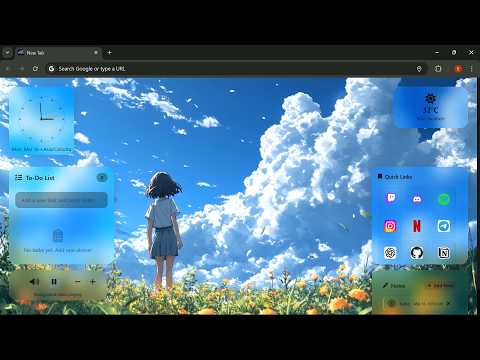
A cinematic productivity-focused new tab dashboard with ambient backgrounds, widgets, and customization.
Halo New Tab Dashboard Halo New Tab Dashboard transforms your Chrome New Tab into a clean, modern, and fully customizable productivity workspace designed for focus, speed, and simplicity. Built for students, developers, creators, and productivity enthusiasts who want a distraction-free yet powerful new tab experience. ━━━━━━━━━━━━━━━━━━ ✨ KEY FEATURES ━━━━━━━━━━━━━━━━━━ • Live clock with date and automatic timezone detection • Customizable clock fonts/styles with multiple visual options • Switch between Digital and Analog clock view directly from the Customize panel • Optional weather widget with improved functionality and user-controlled activation • New Calendar widget for quickly viewing and managing your schedule • New Image widget for displaying and customizing images directly on your dashboard • Built-in To-Do list stored locally on your device • Notes panel to capture thoughts and reminders, with easy viewing and editing anytime • Upgraded 3×3 Quick Links grid for fast access to your favorite websites • Drag-and-drop support for arranging dashboard elements and widgets • Custom image support for Quick Links, allowing users to personalize bookmark icons • Edit mode inside the Control Panel to remove bookmarks easily • More built-in bookmarks, including developer tools, and crypto services • Custom background support (image or video upload) • Ambient background controls (play, pause, and volume adjustment) • Light and Dark themes with improved contrast and readability • Hide or show widgets anytime for a cleaner workspace • Improved responsive design optimized for different screen sizes and devices • Clean, minimal, and professional interface optimized for productivity ━━━━━━━━━━━━━━━━━━ 🔗 ADVANCED QUICK LINKS SYSTEM ━━━━━━━━━━━━━━━━━━ • Fixed 9-slot grid layout for a structured dashboard • Click “+” to add bookmarks instantly • Drag and drop Quick Links for easier organization • Add custom images to Quick Links for a personalized appearance • Choose from many popular websites across categories such as: Social platforms Developer tools Entertainment Search tools Crypto platforms • Clean favicon-only design for a minimal look • Custom image support for personalized Quick Link icons • Edit mode to remove links anytime • All bookmarks are stored locally in your browser ━━━━━━━━━━━━━━━━━━ 🎛 SMART CONTROL PANEL ━━━━━━━━━━━━━━━━━━ Move your cursor to the right edge of the screen to open the Control Panel. From there you can: • Upload or remove background images or videos • Toggle widget visibility • Switch between Light and Dark themes • Switch between Digital and Analog clock mode • Change the digital clock font/style • Enter Quick Links edit mode • Rearrange supported elements using drag and drop • Open the “How to Use” guide ━━━━━━━━━━━━━━━━━━ 🌦 IMPROVED WEATHER EXPERIENCE ━━━━━━━━━━━━━━━━━━ • Optional weather widget that remains disabled until the user enables it • Improved weather display and responsive layout • Weather information adapts better across different screen sizes • Location access is requested only when the weather feature is enabled ━━━━━━━━━━━━━━━━━━ 📅 NEW CALENDAR WIDGET ━━━━━━━━━━━━━━━━━━ • New Calendar widget for quickly viewing your calendar directly from the New Tab • Provides an easy way to keep track of dates and stay organized • Designed to integrate smoothly with the dashboard layout • Can be shown or hidden according to your workspace preferences • Responsive design for a clean experience across different screen sizes ━━━━━━━━━━━━━━━━━━ 🖼 NEW IMAGE WIDGET ━━━━━━━━━━━━━━━━━━ • New Image widget for displaying images directly on your dashboard • Add and customize images to personalize your workspace • Designed to fit naturally within the Halo dashboard layout • Can be shown or hidden whenever needed • Responsive presentation across different screen sizes ━━━━━━━━━━━━━━━━━━ 🚀 FIRST-TIME USER EXPERIENCE ━━━━━━━━━━━━━━━━━━ A new onboarding popup helps first-time users understand how the dashboard works. When the extension is opened for the first time, a short guide appears explaining how to access the Control Panel. Simply move your cursor to the right side of the screen to open the Control Panel and customize your workspace. ━━━━━━━━━━━━━━━━━━ 📱 RESPONSIVE & PROFESSIONAL DESIGN ━━━━━━━━━━━━━━━━━━ Halo New Tab Dashboard has been further refined for a more professional and responsive experience. • Improved responsiveness across different screen sizes • Better spacing and element alignment • Adaptive dashboard layout • Improved widget presentation • Smoother interaction with dashboard controls • Better usability on smaller screens • Clean and consistent visual design ━━━━━━━━━━━━━━━━━━ 🔒 PRIVACY & SECURITY ━━━━━━━━━━━━━━━━━━ Halo New Tab Dashboard replaces only the Chrome New Tab page. It does NOT modify Chrome’s default search provider, search settings, or browsing behavior. • No tracking • No data collection • No personal information stored • No data transmitted to external servers All settings and data are stored locally in your browser. Location access is requested only if the user enables the weather feature, and it is used temporarily to fetch weather data. No location information is stored, logged, or shared. ━━━━━━━━━━━━━━━━━━ Halo New Tab Dashboard delivers a premium, focused, and customizable new tab experience — built for productivity while fully respecting your privacy.
4.8 out of 5215 ratings
Details
- Version1.1.1
- UpdatedSeptember 21, 2026
- Offered byShadow
- Size721KiB
- LanguagesEnglish
- Developer
Email
YK4261882@GMAIL.COM - Non-traderThis developer has not identified itself as a trader. For consumers in the European Union, please note that consumer rights do not apply to contracts between you and this developer.
Privacy

This developer declares that your data is
- Not being sold to third parties, outside of the approved use cases
- Not being used or transferred for purposes that are unrelated to the item's core functionality
- Not being used or transferred to determine creditworthiness or for lending purposes
Support
For help with questions, suggestions, or problems, please open this page on your desktop browser