

Video Information Extractor for Webflow
3 ratings
)
Overview
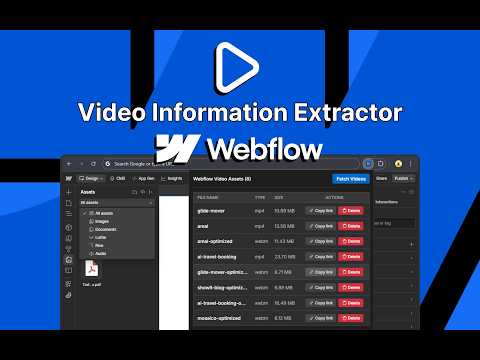
Lists all video assets from the Webflow Designer. Allows copying their links and deleting them.
Webflow is an amazing design tool, but the default asset panel often hides video-specific details. Typically, accessing this raw asset data requires setting up the complex Webflow Data API—a major hurdle if you aren't a developer. Video Information Extractor for Webflow eliminates that technical barrier. It gives you "API-level" access to your video files without requiring any API keys, setup, or coding knowledge. It streamlines your workflow by providing a dedicated panel that lists every video file in your current project. Key Features: - 📄 Instant Asset List: Automatically fetches and lists all video files (MP4, WebM, MOV, etc.) in your project. - 🔗 One-Click Copy: Get the direct CDN URL for any video instantly. Perfect for using in custom code embeds or external players. - 📏 Size & Type Info: See file sizes (in MB) and file types at a glance to help you optimize your site's performance. - 🗑️ Quick Delete: Remove unused or duplicate video assets directly from the extension interface to keep your project clean. - 🔒 Secure & Private: Runs entirely within your browser. No data is sent to external servers. It only interacts with the specific Webflow Designer tab you are working on. Who is this for? - Webflow Developers who need direct video links for custom code. - Designers who need to audit file sizes for site optimization. - Anyone who wants a faster way to manage media in Webflow. How to use: 1. Open your project in the Webflow Designer. 2. Click the extension icon in the toolbar. 3. Click "Fetch Videos" to see your assets.
5 out of 53 ratings
Details
- Version0.0.1
- UpdatedJanuary 28, 2026
- Offered byfrontendcsssimplified
- Size14.43KiB
- LanguagesEnglish (United States)
- Developer
Email
frontendcsssimplified@gmail.com - Non-traderThis developer has not identified itself as a trader. For consumers in the European Union, please note that consumer rights do not apply to contracts between you and this developer.
Privacy

This developer declares that your data is
- Not being sold to third parties, outside of the approved use cases
- Not being used or transferred for purposes that are unrelated to the item's core functionality
- Not being used or transferred to determine creditworthiness or for lending purposes
Support
For help with questions, suggestions, or problems, please open this page on your desktop browser