

PaperTrail
2 ratings
)
Overview
Academic integrity tools for Google Docs. Revision history, authorship consistency, and AI analysis — no verdicts, just evidence.
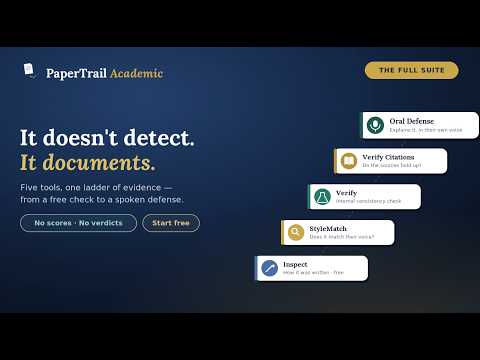
You've read thousands of student essays. You know when something's off. PaperTrail Academic was built by a teacher who needed more than a hunch. Most writing process tools show you what happened. PaperTrail shows you what happened, helps you analyze whether the writing is consistent with the student, checks whether their sources hold up, and — when you want it — lets the student account for their own choices, out loud. A structured, documentable report before you have the hardest conversation in teaching. No verdicts. No accusations. Just evidence — organized, objective, and defensible. ✏️ Inspect — Free, no account required Everything you'd expect from a revision history tool, and considerably more. See the complete writing timeline, watch a full replay with paste and struggle moments highlighted, detect external content with novelty scoring, surface struggle moments where the writer cycled through deletions and rewrites, and track writing sessions and time on task. Every feature Google's Revision History offers — plus the 📊 Process View report, a printable, observational PDF you can save or hand to a department head. Sessions, paste activity (with the actual pasted text), struggle moments, five research-cited writing-process metrics. Fillable form fields for student and assignment, all in your browser. No verdict, no AI, no transmission. Free. 🔍 StyleMatch — Built by a teacher who knows what "this doesn't sound like them" actually means Client-side stylometric analysis across 7 authorship metrics: grammatical function words, discourse marker profile, discourse-marker position, punctuation fingerprint, average sentence length, sentence rhythm, and sentence-length profile. Compare a controlled writing sample against submitted work. Every metric stands independently: no composite score, no overall verdict. The Authorship Consistency Report is yours to interpret. No student text ever leaves your device. 🔬 Verify — For when you want to be thorough before the conversation AI-assisted deep analysis in two modes. The Consistency Report chunks the essay and scores it across seven dimensions — register, vocabulary, sentence complexity, argument depth, authorial voice, error density, and cohesion — rendered as a heatmap with a writer baseline profile. The Baseline Deviation Report compares submitted work against a known writing sample across ten dimensions, with AI-suggested follow-up questions and research citations. Transmitted text is not retained after analysis. 📚 Verify Citations — Does the source really say that? Send the essay with its works-cited list for an Authorship Citation Report. Every citation is checked in three tiers: cross-matched against the bibliography, checked for existence against Crossref, the publisher, and Google Books, and compared claim-vs-source — what the essay says a source says, against what the source actually says, with quotes verified wherever the text is reachable. When a quote isn't in the source, the report says so plainly and hands you the exact question to ask — never an accusation. From 2 PaperTrail Tokens per essay (+1 per additional 25 citations). Text is sent only to run the check and is not retained afterward. 🎙️ Oral Defense — Can they account for it? Turn the essay into a short, voice-based defense. Curate questions about the writer's own choices and send the student a private link — no account needed on their end — and they record brief spoken answers. Questions stay hidden until each one begins, inside a timed answer window. The ownership report states integrity facts plainly — time to first speech, tab switches, copy use — never a score, never a verdict; the call is yours. 2 PaperTrail Tokens per defense. Recordings are deleted when you export the report, or automatically after 30 days. Why PaperTrail? Other tools give you replay. PaperTrail gives you replay, analysis, and a ladder of five independent signals you can climb only as far as a given essay calls for — from a free revision history to a student's own spoken defense — built by someone who has sat across from a student and a parent and needed something more than a gut feeling. Academic integrity isn't about catching students. It's about having a structured, repeatable, documentable conversation grounded in evidence. PaperTrail is built for that conversation. Privacy Inspect (including the Process View report): zero data transmitted, all analysis local — the printable report renders in your browser and never leaves it. StyleMatch: entirely client-side, no text ever transmitted. Verify: text transmitted for analysis only, not retained. Verify Citations: text transmitted to check sources — including a live web search for source text — and is not retained afterward. Oral Defense: the teacher sends the student a private link; PaperTrail stores the essay, questions, the student's name/email, their audio, and session-integrity facts. Audio is deleted when you export the report or automatically after 30 days; the report and transcripts are purged after 90 days.
5 out of 52 ratings
Details
- Version4.0.6
- UpdatedSeptember 22, 2026
- FeaturesOffers in-app purchases
- Offered byPaperTrail Academic
- Size290KiB
- LanguagesEnglish
- Developer
Email
hello@papertrailacademic.com - Non-traderThis developer has not identified itself as a trader. For consumers in the European Union, please note that consumer rights do not apply to contracts between you and this developer.
Privacy

PaperTrail has disclosed the following information regarding the collection and usage of your data. More detailed information can be found in the developer's privacy policy.
PaperTrail handles the following:
This developer declares that your data is
- Not being sold to third parties, outside of the approved use cases
- Not being used or transferred for purposes that are unrelated to the item's core functionality
- Not being used or transferred to determine creditworthiness or for lending purposes
Support
For help with questions, suggestions, or problems, please open this page on your desktop browser