

Browd: AI Browser Agent
1 rating
)
Overview
Open-source AI browser agent. Runs web tasks in your Chrome side panel — data extraction, form filling, and more.
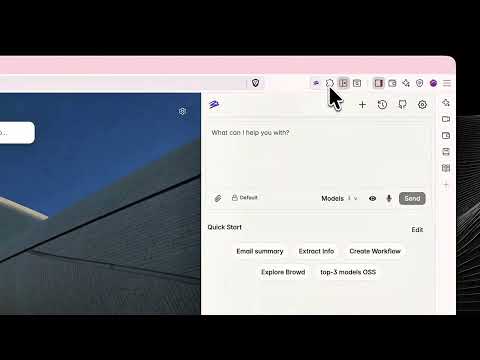
Browd is an open-source AI browser agent that turns instructions into actions in your browser. Ask it to collect information from a page, navigate a website, or help fill out a form — and follow its progress in the side panel. It works in your existing browser session, including websites you’re already signed into. Connect a supported AI provider, choose your model, and describe a task. No Browd subscription. Model usage is billed separately by your chosen AI provider. WHAT YOU CAN DO • Extract key details from a page into a structured answer. • Find a paper and summarize its abstract. • Navigate dashboards and gather information. • Fill out forms using details you provide. • Delegate repetitive tasks that involve opening pages, clicking, typing, and scrolling. WHY BROWD Your browser, your session Work with websites you already use, without setting up a remote browser or copying cookies into another service. Your choice of model Connect supported providers, including OpenAI-compatible endpoints and OpenRouter. Configure models for different agent roles in Settings. Open source Browd is licensed under Apache-2.0. Inspect the code, audit its browser tools, or adapt it to your own workflow. Visible progress Follow the agent’s actions and results in the side panel, with screenshot previews when screenshots are captured. HOW IT WORKS 1. Install Browd and open its side panel. 2. Add your AI provider’s API key and select a supported model. 3. Describe a concrete task and provide any details it needs. 4. Follow the progress and step in when needed. Browd breaks the task into steps, uses browser tools to carry them out, and adjusts its plan as it goes. CONTROL AND ACCESS Browd starts tasks in a dedicated tab marked [Browd]. In Default permission mode, taking over one of your existing tabs requires your approval. Full access mode allows takeover without that in-app prompt. The browser automation runs locally in your browser. Requests to your configured AI provider can include task instructions and relevant page content, including screenshots when vision is used. Keep this in mind when working with sensitive information. THINGS TO KNOW • Multi-step tasks can use substantial tokens. Monitor usage in the side panel and your provider’s dashboard. • Results depend on the selected model and the website. Review important outputs and actions. • Some websites block browser automation or require manual interaction. • Start with a specific task on a specific page for the clearest results. GET STARTED Connect your provider, open a page, and try: “Extract the installation steps from this page.” Source code, issues, and changelog: https://github.com/wyddy7/browd
5 out of 51 rating
Details
- Version0.1.18
- UpdatedOctober 4, 2026
- Offered bywyddy7
- Size1.98MiB
- Languages7 languages
- Developer24 Irakli Abashidze Street T'bilisi 0179 GE
Email
dan47.r@gmail.com - Non-traderThis developer has not identified itself as a trader. For consumers in the European Union, please note that consumer rights do not apply to contracts between you and this developer.
Privacy

Browd: AI Browser Agent has disclosed the following information regarding the collection and usage of your data. More detailed information can be found in the developer's privacy policy.
Browd: AI Browser Agent handles the following:
This developer declares that your data is
- Not being sold to third parties, outside of the approved use cases
- Not being used or transferred for purposes that are unrelated to the item's core functionality
- Not being used or transferred to determine creditworthiness or for lending purposes
Support
For help with questions, suggestions, or problems, visit the developer's support site