


Overview
Batch download your available Suno songs as MP3 or M4A to one folder or ZIP, with cover art, lyrics, prompts, and metadata.
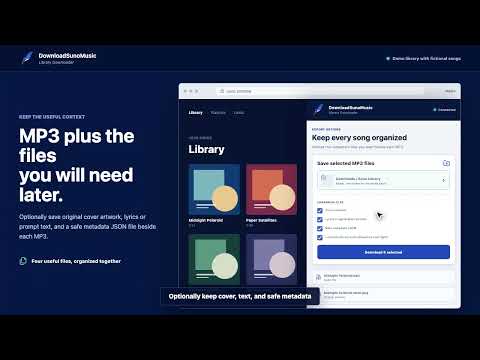
Batch download available songs from your Suno library as MP3 or M4A without opening a Save dialog for every file. The extension connects to the Suno session already open in Chrome, scans the current library, and shows each song's title, creator, cover, duration, model, and availability. Search or filter the list, select the songs you want, choose a local folder once, and let the queue save available MP3 or M4A files sequentially. Optional companion files keep each export useful outside Suno: original cover artwork, lyrics or generation prompt text, and a safe metadata JSON file. Free accounts include 10 successful song downloads for the lifetime of the account. The same song never consumes the allowance twice, and failed or canceled downloads do not count. An optional Pro subscription removes the lifetime total, supports batches of up to 200 songs, and unlocks local single-ZIP output. Subscription checkout and management take place on DownloadSunoMusic.com. Features: - Scan a signed-in Suno library with pagination. - Search and filter songs before downloading. - Select visible songs or an entire scanned library. - Choose one destination folder for the batch. - Connect a free DownloadSunoMusic account with a one-time website code; Google credentials and website cookies are not shared with the extension. - Save 10 songs for the lifetime of a Free account, or use Pro for unlimited total downloads and batches up to 200 songs. - Save separate files for recoverable batches or, with Pro, build one local ZIP for up to 200 selected songs. - Include cover artwork, lyrics or prompt text, and safe metadata JSON when needed. - Skip songs previously saved by the extension. - In folder mode, pause after the current file, cancel, resume, and retry failures. - Keep ZIP creation local; no song bytes are sent to DownloadSunoMusic servers. - Keep audio transfers direct between Suno's media host and the selected local folder. - Optionally sync up to 5,000 songs or 100 MB of encrypted metadata to Cloud Library for cross-device search and catalog recovery. This is off by default. - Optionally include lyrics and prompts in Cloud Library with a separate consent control. Delete all cloud data from the side panel at any time. - Optionally share anonymous product analytics with a separate control that is off by default. Only download songs that your account is allowed to download and that you own, are licensed to use, or have permission to use.
0 out of 5No ratings
Details
- Version0.8.1
- UpdatedSeptember 22, 2026
- Size150KiB
- LanguagesEnglish
- DeveloperHuman Continuum, Inc.Website
1111B S Governors Ave Ste 24559 Dover, DE 19904-6903 USEmail
support@downloadsunomusic.comPhone
+1 302-401-7742 - TraderThis developer has identified itself as a trader per the definition from the European Union and committed to only offer products or services that comply with EU laws.
- D-U-N-S149879543
Privacy

Suno Downloader - DownloadSunoMusic has disclosed the following information regarding the collection and usage of your data. More detailed information can be found in the developer's privacy policy.
Suno Downloader - DownloadSunoMusic handles the following:
This developer declares that your data is
- Not being sold to third parties, outside of the approved use cases
- Not being used or transferred for purposes that are unrelated to the item's core functionality
- Not being used or transferred to determine creditworthiness or for lending purposes
Support
For help with questions, suggestions, or problems, visit the developer's support site