

Ulearn - YouTube Quiz & Spaced Repetition

Overview
AI quizzes from YouTube videos with spaced repetition. AI features use Ulearn Credits. Free to browse courses.
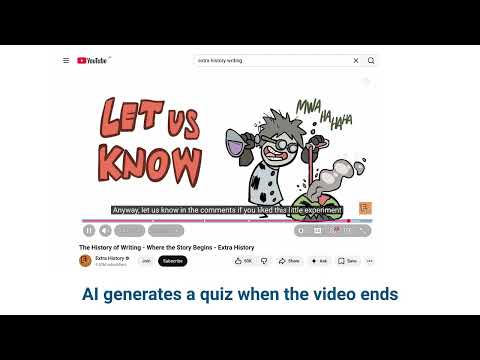
Stop passively watching. Start actively learning. Ulearn automatically quizzes you on YouTube videos to make sure you actually remember what you watch. It uses AI to generate smart multiple-choice questions from video transcripts, then saves them to a spaced repetition dashboard so you review at the perfect time. HOW IT WORKS 1. Watch a YouTube video like normal 2. Near the end, Ulearn pauses the video and quizzes you on what you just watched 3. Answer 5 multiple-choice questions based on the content you've seen so far 4. Choose to save the quiz to your dashboard for long-term review 5. The dashboard schedules reviews using spaced repetition so you never forget SMART AUTO-QUIZ - Automatically generates a quiz when you finish watching a video - Questions are based only on the portion of the video you've watched - Uses the video transcript for deep, conceptual questions (not just trivia) - Falls back to video title and description when no transcript is available - Works on regular videos and YouTube Shorts - Skips music videos automatically ALWAYS YOUR CHOICE - "Don't need quiz" button lets you skip instantly on videos like yoga or entertainment - Choose between Multiple Choice and Free Response on any question - Save quiz results to your dashboard or just move on - Skipped quizzes come back next time you watch the same video SPACED REPETITION DASHBOARD - Built-in flashcard system with owl-themed stages: Hatchling, Fledgling, Hunter, Sage Owl, Elder Owl - Cards from YouTube quizzes automatically organize into decks by subject (Math, Science, History, etc.) - Each quiz session creates a "pile" inside the deck with a link back to the original YouTube video - Review cards with MCQ or free response, switch modes on any card - AI tutor chat for hints without giving away the answer - Create your own decks and cards manually too SYNCS ACROSS DEVICES - Sign in with email to sync your decks and progress - Works offline with local storage, syncs when you're back online - Password manager friendly login (works with LastPass, 1Password, etc.) CUSTOMIZABLE - Adjust font size during quizzes (small, medium, large) - Set grading strictness (lenient to harsh) - Choose kindness level for AI feedback - Pick a tutor theme or character - AI grading for free response answers CLEAN QUIZ DESIGN - Questions test understanding, not memorization - Timestamp links let you jump back to the relevant part of the video - Copy quiz questions to share with others WHAT MAKES ULEARN DIFFERENT Most YouTube learning tools just bookmark or summarize. Ulearn actually tests you, then brings those questions back at scientifically-timed intervals so the knowledge sticks. It's the difference between watching and learning.
5 out of 53 ratings
Details
- Version6.8.15
- UpdatedJune 14, 2026
- FeaturesOffers in-app purchases
- Size606KiB
- LanguagesEnglish (United States)
- DeveloperWebsite
Email
academysiegel@gmail.com - Non-traderThis developer has not identified itself as a trader. For consumers in the European Union, please note that consumer rights do not apply to contracts between you and this developer.
Privacy

Ulearn - YouTube Quiz & Spaced Repetition has disclosed the following information regarding the collection and usage of your data. More detailed information can be found in the developer's privacy policy.
Ulearn - YouTube Quiz & Spaced Repetition handles the following:
This developer declares that your data is
- Not being sold to third parties, outside of the approved use cases
- Not being used or transferred for purposes that are unrelated to the item's core functionality
- Not being used or transferred to determine creditworthiness or for lending purposes
Support
For help with questions, suggestions, or problems, visit the developer's support site