


Overview
Hand one site's login from your Chrome to Momentaic, only when you ask, one site at a time.
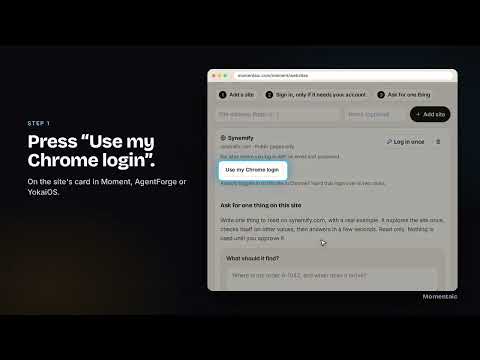
== Description Some websites never let an assistant in: "Sign in with Google", captchas, "this browser may not be secure". You are already logged in to them in Chrome. Momentaic Connect lets your Momentaic assistant (Moment, AgentForge or YokaiOS) use that login to read the one thing you ask for. How it works 1. On a site in Momentaic, press "Use my Chrome login". 2. A small window names the one site. Press "Share my login". 3. Chrome asks you to allow that one site. Allow it. 4. Only that site's login is sent, once, with a code that expires in 10 minutes. The extension gives Chrome's access back right away. Safe by design • It runs only on momentaic.com, agentforgeai.com, yokaios.com and aimae.shop, plus the one site you approve each time. • Momentaic keeps the login encrypted and only reads with it. It never buys, books, posts or changes anything. • Remove a saved login any time on the site's card in Momentaic. • No tracking, no ads, no data sold. Needs a Momentaic account: momentaic.com
0 out of 5No ratings
Details
- Version1.0.0
- UpdatedOctober 29, 2026
- Size7.89KiB
- LanguagesEnglish (United States)
- Developer
- Non-traderThis developer has not identified itself as a trader. For consumers in the European Union, please note that consumer rights do not apply to contracts between you and this developer.
Privacy

Momentaic Connect has disclosed the following information regarding the collection and usage of your data. More detailed information can be found in the developer's privacy policy.
Momentaic Connect handles the following:
This developer declares that your data is
- Not being sold to third parties, outside of the approved use cases
- Not being used or transferred for purposes that are unrelated to the item's core functionality
- Not being used or transferred to determine creditworthiness or for lending purposes