

PortifyLead: Save LinkedIn Profiles to Your CRM + AI Sales Brief

Overview
Save LinkedIn profiles and company pages to your CRM, with an AI Sales Brief written from your conversation.
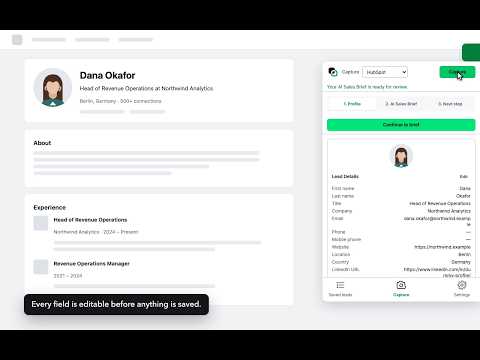
Move a LinkedIn profile into your CRM without copy-paste. PortifyLead adds a panel to LinkedIn. Open it on a profile or a company page, check the fields it captured, and save them to the destination you connected — a record in your CRM, or a row in your spreadsheet. WHAT IT DOES • Captures the details visible to you on the page — name, title, company, location, and more — from a person's profile or a company page • Lets you review and edit every field before anything is saved • Maps captured fields to your own destination fields, custom fields included • Checks for an existing contact with the same email before saving, and offers to update it instead of creating a second one • Creates a follow-up task and assigns an owner, where the destination supports it • Keeps the list of what you saved, in the extension, and exports it as CSV • Writes an AI Sales Brief from the LinkedIn conversation you already had — a summary, what the person appears to want, and a suggested next step. You review and edit it before it is saved, like every other field. HOW YOUR DATA AND CREDENTIALS ARE HANDLED You connect a destination in the PortifyLead portal. The authorization is encrypted and held on our servers; the extension never stores a CRM credential or receives an access token. When you save, the details you reviewed pass through the PortifyLead API to your destination, processed in memory for that request only and not retained. WHAT IT DOES NOT DO PortifyLead acts only when you click. It does not provide a LinkedIn inbox, does not monitor conversations, does not load messages in the background, and never sends messages on your behalf. Free to start. Paid plans raise the monthly limits on saves and AI Sales Briefs. Pricing: https://www.portifylead.com/pricing Privacy: https://www.portifylead.com/privacy Help: https://www.portifylead.com/help
0 out of 5No ratings
Details
- Version0.3.3
- UpdatedOctober 24, 2026
- FeaturesOffers in-app purchases
- Size422KiB
- Languages2 languages
- DeveloperWebsite
Email
support@portifylead.com - Non-traderThis developer has not identified itself as a trader. For consumers in the European Union, please note that consumer rights do not apply to contracts between you and this developer.
Privacy

PortifyLead: Save LinkedIn Profiles to Your CRM + AI Sales Brief has disclosed the following information regarding the collection and usage of your data. More detailed information can be found in the developer's privacy policy.
PortifyLead: Save LinkedIn Profiles to Your CRM + AI Sales Brief handles the following:
This developer declares that your data is
- Not being sold to third parties, outside of the approved use cases
- Not being used or transferred for purposes that are unrelated to the item's core functionality
- Not being used or transferred to determine creditworthiness or for lending purposes
Support
For help with questions, suggestions, or problems, please open this page on your desktop browser