


Overview
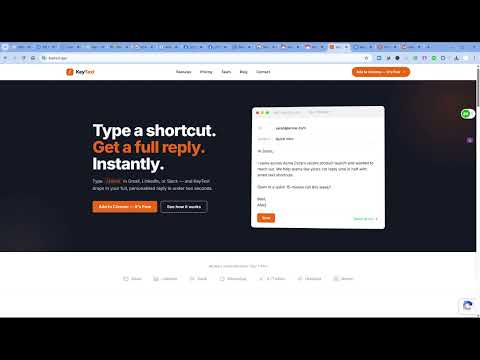
Type /shortcuts to instantly paste canned responses anywhere. Smart variables, folders, works in Gmail, LinkedIn, Slack & more.
KeyText is an AI text expander for Chrome. Type /intro in Gmail, LinkedIn, Slack, or any text field and your full message appears — then highlight any sentence and let AI rewrite it shorter, more formal, or in another language. Built for people who send the same message fifty times a week: sales reps, recruiters, support agents, and founders. Free forever: 15 snippets, every integration, 50 AI actions a month. No card. 🚀 WHAT KEYTEXT DOES KeyText is a Chrome extension that combines a classic text expander (type a shortcut, get a full message) with native AI for drafting, rewriting, and replying — all inside the text field you're already typing in. It's built for the people who answer the same prospect, candidate, or customer questions 50+ times a week: sales reps, recruiters, support agents, account managers, founders. 🚀 HOW IT WORKS 1. Create a snippet — pick a trigger like /intro, paste your message, drop in smart variables like {{first_name}}. Takes 30 seconds. 2. Type the shortcut anywhere — in Gmail, LinkedIn... or any text field. Start typing / and a clean dropdown shows matching snippets. 3. Press Enter. Done. Your full reply drops in. Variables highlight for instant fill-in — press Tab to jump between them. Two seconds total, instead of forty-five. 🚀 KEY FEATURES - Slash commands: type /intro, /followup, /pricing in any text field - Smart variables: {{first_name}}, {{company}}, {{today}}, {{tomorrow}}, custom values - AI rewriting: highlight text, get shorter / formal / translated / custom-tone versions inline - AI snippet generation: describe a snippet in plain language, AI writes it - Auto-reply chat: AI drafts a reply that knows the conversation context - Snippet folders: organize by team, project, or use case - One-click import: bring your library from Text Blaze, TextExpander, Magical, or a CSV - Encrypted sync: snippets sync across your Chrome devices via end-to-end encrypted storage - Works offline: expansion works without internet; only AI calls need a connection - Analytics: see hours saved per week, most-used snippets, time-to-reply trends 🚀 WHERE IT WORKS KeyText runs in every standard text field and rich editor on the web within Chrome browser: 🚀 WHAT MAKES KEYTEXT DIFFERENT KeyText is built differently from Text Blaze, TextExpander, Magical, and Blaze Today in three ways: - AI-native, not bolted on — every snippet can be rewritten, translated, or shortened with AI inline. No tab-switching to ChatGPT. - Browser-native — no desktop app to install, no admin permission, no IT approval. Works on every site automatically the moment you install. - Free forever — 15 snippets, 50 AI actions per month, every integration, no credit card. 💰 PRICING Free — 15 snippets, 3 folders, every integration, 50 AI actions per month: - 15 snippets - 3 folders - 50 AI generations per day - All smart variables - Rich text formatting - Works in every text field - Import from Text Blaze, TextExpander, Typedesk, CSV, JSON Pro — $4.99 per month, billed annually. Unlimited snippets, 2,500 AI actions per month, priority support: - Unlimited snippets - Unlimited folders - 2,500 AI generations per month - AI tone rewriting (formal, casual, empathetic, shorter, longer) - Full usage analytics ("You saved 2.3 hours this week") - Custom trigger characters (/ ; . : or custom whatever) - BYOK (Bring Your Own Key) — connect OpenAI, Anthropic, or Google - Priority support Team — $3.99 per seat per month. Shared snippet libraries, 3,500 AI actions per seat per month, team analytics, SSO: - Everything in Pro - Shared folders and team libraries - 3,500 AI generations per month - Team usage analytics dashboard - Admin controls and roles - Onboarding support For ALL, even the free tier, 7-day Pro trial available, no credit card required to start. 🔐 PRIVACY-FIRST ARCHITECTURE - Snippets sync via Chrome's encrypted sync storage and Supabase - AI calls are proxied through KeyText's API — nothing logged for model training - No keystroke logging — KeyText reads from input fields only when expanding a snippet - Export your entire library or delete your account in one click, any time - Open about our subprocessors at keytext.app/security 👥 PERFECT FOR - Sales reps writing prospecting and follow-up sequences - Recruiters sending candidate outreach, scheduling, and offer messages - Customer support agents answering repeat tickets - Account managers running quarterly business reviews - Founders replying to investor and customer email - Anyone typing more than 30 emails a day 🔥 COMING SOON (Phase 2–3) - REST API + Webhooks - Native n8n community node (first text expander with one) - Zapier integration - Firefox extension - Arabic + RTL support (first in the category) - Template marketplace with revenue sharing - iOS + Android keyboard apps - Windows + Mac desktop apps - Enterprise SSO and audit logs 🚀 SWITCH FROM YOUR CURRENT TOOL One-click import keeps your existing snippets: ● Text Blaze — import via .json export ● TextExpander — import via .plist or .json ● Magical — paste your shortcuts library ● Blaze Today — import via CSV ● Anything else — paste a CSV with two columns (trigger, content) Your /intro from any of those tools becomes /intro in KeyText, untouched. 🚀 GET STARTED Install KeyText, click the toolbar icon, create your first snippet. You'll save your first hour by Friday. Learn more, see live demos, and read the docs at keytext.app. Questions or feedback: hello@keytext.app 📧 SUPPORT & FEEDBACK - Email: support@keytext.app - Help center: https://keytext.app/docs/ - Twitter: @keytextApp - LinkedIn: /company/keytextApp **Privacy at a glance.** KeyText is built privacy-first. By default, your snippets are stored only on your device. AI rewriting on Chrome 127+ runs locally via Gemini Nano — nothing leaves your browser. Cloud features (sync, advanced AI) are opt-in and clearly labeled. We do not track your browsing, we do not sell data, and we do not use your snippets to train AI. Full policy: https://keytext.app/privacy Try KeyText free today. No credit card required. 30-second install. Text Expander.
4.8 out of 58 ratings
Details
- Version1.0.71
- UpdatedAugust 10, 2026
- FeaturesOffers in-app purchases
- Size3.06MiB
- LanguagesEnglish
- DeveloperWebsite
Email
dahabra@gmail.com - Non-traderThis developer has not identified itself as a trader. For consumers in the European Union, please note that consumer rights do not apply to contracts between you and this developer.
Privacy

KeyText: AI Text Expander & Snippets has disclosed the following information regarding the collection and usage of your data. More detailed information can be found in the developer's privacy policy.
KeyText: AI Text Expander & Snippets handles the following:
This developer declares that your data is
- Not being sold to third parties, outside of the approved use cases
- Not being used or transferred for purposes that are unrelated to the item's core functionality
- Not being used or transferred to determine creditworthiness or for lending purposes
Support
For help with questions, suggestions, or problems, please open this page on your desktop browser