

KeyParts: video summary & key moments for YouTube

Overview
Summarize a YouTube video before you watch it: sections with timestamps, a short summary and the parts worth watching.
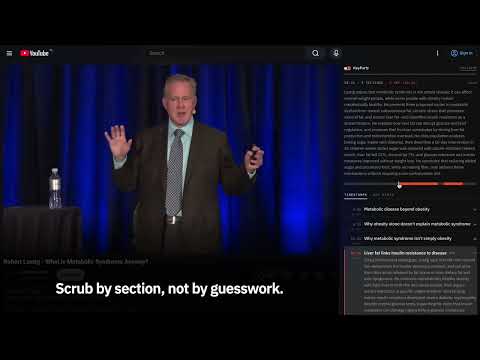
KeyParts shows what a YouTube video is about and where the parts that matter are, before you give it your time. ON A VIDEO PAGE In the right column, the extension shows the video's summary: a few sentences on what it is about, a timeline split into sections, and the list of sections with timestamps and what is said in each. The parts especially worth watching are marked. Click a section's timestamp, or anywhere on the timeline, and the video jumps there. ON LISTS OF VIDEOS A small KeyParts mark stands before each video's title. Click it to see the summary without opening the video. SAVED FOR LATER You can save a video for later. The list under the KeyParts icon orders saved videos by how many minutes in each are worth watching. LANGUAGES The summary can be in the video's language, in English or in Polish. The extension itself comes in English and Polish. ACCOUNT AND PLANS After the install, the options page opens. Click "Connect", then create an account at keyparts.app or sign in. The free plan starts once your e-mail address is confirmed: 3 videos a day, up to 3 hours in total, for 7 days. After that, two ways on. Basic is free with no daily limit: the summary is made on your own computer by the model built into Chrome (Chrome only, a one-time download of about 4 GB, shorter sections). Pro gives 20 hours of video a day for $5 a month; details and availability at keyparts.app. PRIVACY The extension sends our server only the caption text YouTube already displays, with the video's title and channel name. Never the picture or the sound, and nothing about your other tabs. On the Basic plan the captions do not leave your computer at all. On lists of videos it sends the ids of the videos on screen, to mark the ones that already have a summary.
5 out of 51 rating
Details
- Version0.2.14
- UpdatedNovember 8, 2026
- FeaturesOffers in-app purchases
- Size174KiB
- Languages2 languages
- DeveloperEMWU IT SERVICES MICHAŁ WOJDYŁAWebsite
Ul. Nadbrzeżna Górna 4 Tarnów 33-100 PLEmail
contact@afterglow.org.plPhone
+48 605 976 999 - TraderThis developer has identified itself as a trader per the definition from the European Union and committed to only offer products or services that comply with EU laws.
- D-U-N-S850992114
Privacy

KeyParts: video summary & key moments for YouTube has disclosed the following information regarding the collection and usage of your data. More detailed information can be found in the developer's privacy policy.
KeyParts: video summary & key moments for YouTube handles the following:
This developer declares that your data is
- Not being sold to third parties, outside of the approved use cases
- Not being used or transferred for purposes that are unrelated to the item's core functionality
- Not being used or transferred to determine creditworthiness or for lending purposes
Support
For help with questions, suggestions, or problems, visit the developer's support site