

Keybr CC Extension
1 rating
)
Overview
An unofficial browser extension for showing layout of CharaChorder devices on Keybr
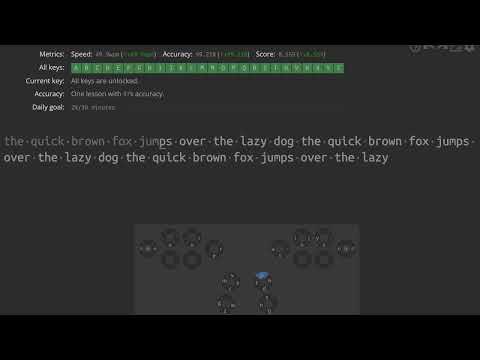
An unofficial browser extension that displays the layout of CharaChorder input devices (CharaChorder One, CharaChorder Two, CCU, Master Forge and CharaChorder Lite) on [Keybr](https://www.keybr.com/). With this extension, users can familiarize themselves with the layouts of CharaChorder input devices directly on Keybr. After installation, click the extension icon to open an option page, where you can choose a layout type (3D input device or Lite), import a device layout file, choose which device layout to display, toggle the thumb-3 switch, toggle key highlighting, and choose an OS keyboard layout. Clicking the settings button on the layout enters edit mode, allowing you to adjust its position, size, and transparency by dragging, resizing, and scrolling. # Disclaimer This extension is not affiliated, associated, authorized, endorsed by, or in any way officially connected with CharaChorder and Keybr. # Changelog ## 9.1 - Fix CharaChorder Lite layout falling back to CC1 device layout ## 9.0 - Support CharaChorder Lite device layout - Fix space not highlighted issue ## 8.2 - Fix highlight bug of |\ character ## 8.1 - Change repo back to github ## 8.0 - Fix right space doesn't have key label and highlight bug - Add single hand device layouts - Export device layout - Change repo to gitlab - Option for toggling highlight ## 7.0 - Support fourth layer - Add CCU ## 6.3 - Fix bug in detection rules of num-shift and fn-shift - Add more information in manifest - Fix layout view blocking mouse event error - Add cursor pointer style to buttons in layout view ## 6.2 - Fix popover blocked problem ## 6.1 - Reduce opacity of setting button ## 6.0 - Adjustable size and transparency ## 5.0 - Setting for OS keyboard layout ## 4.1 - Hide all original keyboard previews on Keybr ## 4.0 - Use Material UI to style the options page ## 3.2 - Fix bug in custom layout when its A3 layer has any character keys ## 3.1 - Revert to 2.0 due to a bug in the custom layout ## 3.0 - Setting for custom device layout ## 2.0 - Updating extension icons and descriptions - Storing settings into local browser storage ## 1.0 - Showing CharaChorder 3D input device layout on keybr.com - Current key highlighting in the visual guide - Setting for switching between default CharaChorder One/Two and Master Forge - Draggable visual guide
5 out of 51 rating
Details
- Version9.1
- UpdatedSeptember 6, 2026
- Offered byTangent Chang (andy23512)
- Size1.2MiB
- LanguagesEnglish (United States)
- Developer
Email
andy23512@gmail.com - Non-traderThis developer has not identified itself as a trader. For consumers in the European Union, please note that consumer rights do not apply to contracts between you and this developer.
Privacy

This developer declares that your data is
- Not being sold to third parties, outside of the approved use cases
- Not being used or transferred for purposes that are unrelated to the item's core functionality
- Not being used or transferred to determine creditworthiness or for lending purposes
Support
For help with questions, suggestions, or problems, please open this page on your desktop browser