Item logo image for keeptidy

keeptidy

Item media 6 (screenshot) for keeptidy
Item video thumbnail
Item media 2 (screenshot) for keeptidy
Item media 3 (screenshot) for keeptidy
Item media 4 (screenshot) for keeptidy
Item media 5 (screenshot) for keeptidy
Item media 6 (screenshot) for keeptidy
Item video thumbnail
Item media 2 (screenshot) for keeptidy
Item media 3 (screenshot) for keeptidy
Item media 4 (screenshot) for keeptidy
Item media 5 (screenshot) for keeptidy
Item media 6 (screenshot) for keeptidy

Overview

Tidy old browser data — sweep dormant sites on a schedule.

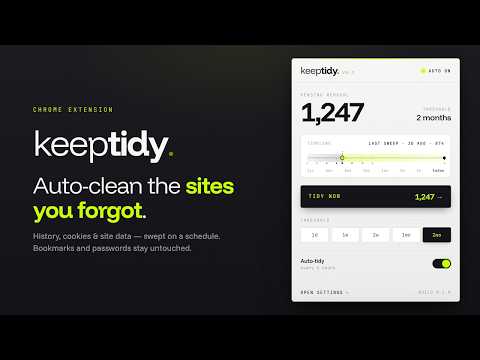
keeptidy quietly cleans up after the sites you've stopped using. Once a domain hasn't shown up in your history within a threshold you choose, keeptidy treats it as dormant and wipes its site-attached data on the next scheduled sweep: cookies, local storage, IndexedDB, service workers, and cache. History and download entries older than your threshold are trimmed across all sites. Your bookmarks and saved passwords are never touched. FEATURES Threshold — drag-to-set on a log-scale timeline, or pick a preset from 1 day to 1 year. Frequency — manual, hourly, every 6 hours, or every 24 hours. Based on browser uptime, not wall-clock time. Categories — independently choose which data types get cleaned: history, downloads, cookies, site data. Exempt list — wildcard-aware patterns like *.notion.so or localhost. Ships with sensible defaults for SSO providers, common work and dev tools, and localhost. Erase everything — a one-shot full wipe that still leaves bookmarks and passwords alone. Dark mode — follows your system color preference automatically. PRIVATE BY DESIGN keeptidy collects nothing and sends nothing anywhere. All cleaning happens locally in your browser, and your settings stay on your device. There are no servers, no analytics, and no remote code. keeptidy is open source.

Details

  • Version
    0.1.3
  • Updated
    June 1, 2026
  • Offered by
    Al Brown
  • Size
    90.16KiB
  • Languages
    English
  • Developer
    Email
    darkwinglabs@gmail.com
  • Non-trader
    This developer has not identified itself as a trader. For consumers in the European Union, please note that consumer rights do not apply to contracts between you and this developer.

Privacy

Manage extensions and learn how they're being used in your organization
The developer has disclosed that it will not collect or use your data. To learn more, see the developer’s privacy policy.

This developer declares that your data is

  • Not being sold to third parties, outside of the approved use cases
  • Not being used or transferred for purposes that are unrelated to the item's core functionality
  • Not being used or transferred to determine creditworthiness or for lending purposes

Related

Cookie Deleter

3.2

Delete cookies and site data for specific sites using flexible cleanup rules.

Chrono — website time tracker

0.0

Tracks how long you spend on each site, with hour-by-hour history and daily limits. Data never leaves your browser.

Datarag: Search History

5.0

Browsers delete history after 90 days. Datarag keeps it forever. Auto-saved, encrypted, searchable. Your browser history, perfected.

Surflog - Screen Time Tracker, Site Blocker, Analytics & Browser Wrapped

5.0

Track screen time, block distracting sites, and get private daily to yearly browser wrapped recaps. 100% on-device.

History AutoDelete

4.8

Automatically delete Chrome history older than a set duration.

Lil Bro Wipe – History Cleaner

0.0

Wipes the sites and words you pick out of your history: as you browse, or the next time you open the browser.

Site History Cleaner

0.0

Delete browsing history for the current site with one click

Clear Site Data

0.0

Quickly clear site data for the current tab. Control what to remove: cookies, cache, local storage, and more.

Domain Cleaner

5.0

Clear cache, cookies and site data for the active tab's domain. Supports presets and keyboard shortcuts.

Ghost Sites: Auto-Delete History

5.0

Automatically removes specific sites from your browsing history

Time Tracker Yantrika

5.0

Track time spent on different tabs and manage browser clutter.

Auto History & Cache Cleaner (Pro)

5.0

Quickly delete your visited pages (history), cookies, temporary files (cache), passwords, and other saved internet data.

Cookie Deleter

3.2

Delete cookies and site data for specific sites using flexible cleanup rules.

Chrono — website time tracker

0.0

Tracks how long you spend on each site, with hour-by-hour history and daily limits. Data never leaves your browser.

Datarag: Search History

5.0

Browsers delete history after 90 days. Datarag keeps it forever. Auto-saved, encrypted, searchable. Your browser history, perfected.

Surflog - Screen Time Tracker, Site Blocker, Analytics & Browser Wrapped

5.0

Track screen time, block distracting sites, and get private daily to yearly browser wrapped recaps. 100% on-device.

History AutoDelete

4.8

Automatically delete Chrome history older than a set duration.

Lil Bro Wipe – History Cleaner

0.0

Wipes the sites and words you pick out of your history: as you browse, or the next time you open the browser.

Site History Cleaner

0.0

Delete browsing history for the current site with one click

Clear Site Data

0.0

Quickly clear site data for the current tab. Control what to remove: cookies, cache, local storage, and more.

Google apps