


Overview
Improve your English so it sounds native — see what was wrong, save it, then review it. Plus instant translation of any selection.
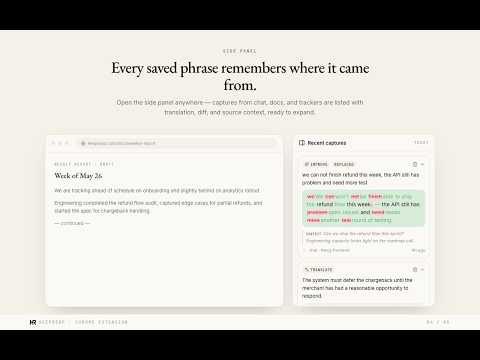
You meet the word. You look it up. You forget it. Over and over, three times a day — the same words slipping through your fingers. The reading happens. The learning doesn't. KeepReap catches them before they slip. Select any sentence on any page. A small floating toolbar appears right beside it: • Translate it — AI that reads nuance, not just words. • Improve it — your phrasing, rewritten to sound native. • Save it — the sentence, its page, its URL. Caught. • Speak it — hear the line read aloud. • Copy it — clean text, ready to paste anywhere. • Pin it — the lines you want back fast, all on one board. Keep the buttons you use. Hide the rest. A side panel rides along beside the article: paste a draft to translate or improve, and keep your latest catches in view. Hover any word in a result and the meaning comes to you — translation, definition, CEFR level — without leaving the line you were reading. Right-click to pin a whole page for later. Start catching before you make an account — your first sentences are waiting when you sign in. From there everything syncs to keepreap.com, where spaced repetition brings it back as typing prompts, cloze cards, and weekly tests — again and again, until "again" finally means you remember. The words you caught come back as reading, too: KeepReap writes them into short stories, so you meet them in sentences instead of on flashcards. Studying for an exam? Start from a ready-made list — IELTS, TOEFL, BEC and nearly 200 others — instead of waiting to bump into the words yourself. KeepReap moves only when you do. It never reads your pages in the background. Start free, with a fresh batch of credits every month. Plus and Pro unlock a lot more translating and improving.
0 out of 5No ratings
Details
- Version0.3.10
- UpdatedSeptember 30, 2026
- Size993KiB
- Languages8 languages
- DeveloperWebsite
Email
keepreap.ops@gmail.com - Non-traderThis developer has not identified itself as a trader. For consumers in the European Union, please note that consumer rights do not apply to contracts between you and this developer.
Privacy

KeepReap — Improve Your English & Remember It has disclosed the following information regarding the collection and usage of your data. More detailed information can be found in the developer's privacy policy.
KeepReap — Improve Your English & Remember It handles the following:
This developer declares that your data is
- Not being sold to third parties, outside of the approved use cases
- Not being used or transferred for purposes that are unrelated to the item's core functionality
- Not being used or transferred to determine creditworthiness or for lending purposes
Support
For help with questions, suggestions, or problems, visit the developer's support site