

Keepmarks

Overview
A convenient interface to organize your Bookmarks.
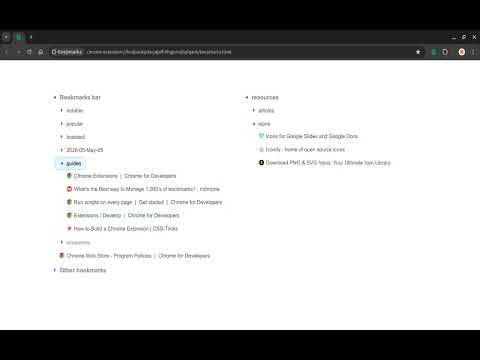
Explore, preview and restructure bookmarks. It is implemented as a single page activated on clicking the extension's action icon. Explore, Preview and Restructure bookmarks conveniently. On clicking the extension icon, a new tab opens in the current window if one is not already open. If the extension's page is already open, then the opened tab is made the current tab. Initially, the bookmarks are presented in a single column layout. The single column layout is excellent for exploring the various bookmark folders conveniently as it is quite compact. In case the height is very long, right click and extract the subfolder as a new column. This will create a new column with the folder contents displayed. New columns may be added in this manner and also folders may be moved to adjacent columns as well. An important feature of this tool is that you can also reorganize folders, URLs by dragging and dropping it as needed. This is quite intuitive and works as expected. It is also possible to edit folders a well as URLs using right click. To edit a folder, the relevant entry is opened in Chrome's Bookmarks Manager. The URL may be edited within the page itself by entering the required values in the modal that pops up. In summary, this is a customizable, convenient and coherent Bookmarks Organizer. Source code is available under MIT License at https://github.com/abdullah85/keepmarks Changelog : ### Version 0.1.0.0 - May 4, 2025 - Initial version with features for modifying folder structures, bookmarks on drag and drop. - Retained the context menu for previewing the folders while modifying folders on drag and drop. - Refactored, removed features for customization to focus on functionality instead of styling.
0 out of 5No ratings
Details
- Version0.1.0.0
- UpdatedMay 8, 2026
- Offered bybitwiserdev
- Size3.25MiB
- LanguagesEnglish
- Developer
Email
bitwiserdev@gmail.com - Non-traderThis developer has not identified itself as a trader. For consumers in the European Union, please note that consumer rights do not apply to contracts between you and this developer.
Privacy

This developer declares that your data is
- Not being sold to third parties, outside of the approved use cases
- Not being used or transferred for purposes that are unrelated to the item's core functionality
- Not being used or transferred to determine creditworthiness or for lending purposes
Support
For help with questions, suggestions, or problems, please open this page on your desktop browser