


Kopsavilkums
KeePass palīgs akreditācijas datu ievietošanai, paroļu ģenerēšanai un jaunu pieteikumu saglabāšanai bez kopēšanas.
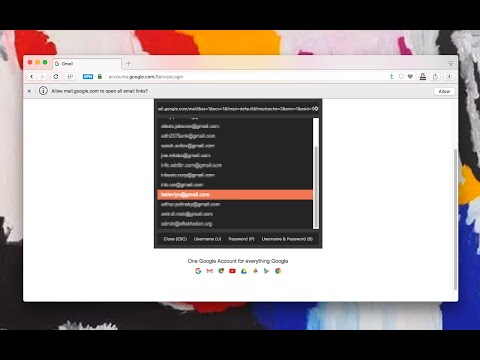
The KeePassHelper is a browser extension to provide the username and password access from the KeePass (https://keepass.info/), KeePassXC (https://keepassxc.org/), and MacPass (https://macpassapp.org/) applications within your browser. The extension adds an action button to your browser toolbar area. Pressing the button opens a panel that displays all the matching credentials for the current domain. You can ask the extension to insert the username, password, or both by pressing the action buttons. The extension also optionally submit the login form if you would like to. This extension offers a built-in OTP (One-time password) tool, so you don't need to have a separate plugin. This extension supports the following applications: 1. KeePass application with KeePassHttp installed 2. KeePassXC with a custom manifest (uses native messaging to communicate) 3. Direct read of KDBX3 or KDBX4 databases (when you cannot install a native application) 4. Any other alternatives that support HTTP communication (such as MacPass) Notes: 1. When using this extension, first make sure the login or password input box is focused on the page before opening the panel. Username and password filling occur if an input element is selected on a form. 2. It is recommended to use the extensions manager of your browser to define a custom shortcut for this extension. This way you can fill the username and password fields without using your mouse. This extension supports keyboard shortcuts for almost all the actions. 3. It is possible to generate one-time password tokens using this extension. 4. This extension optionally supports automatic logins (this feature is not yet supported on manifest v3). 4. This extension also supports native messaging communication for KeePassXC. Go to the options page to configure the extension to work with KeePassXC. 5. As of version 0.6.7, the extension supports reading the native string fields of KeePass for generating time-based passwords ("TimeOtp-Secret-Base32", "TimeOtp-Period" and "TimeOtp-Length" keys are supported) 6. If you are not using the built-in OTP feature of the KeePass application, the OTP can optionally be stored in SHA-256 encryption. This is additional password protection for your secret keys. FAQs Page: http://add0n.com/keepass-helper.html Bug Reports: https://github.com/belaviyo/keepass-macpass-helper/ Privacy Policy: https://add0n.com/policies/unixeco.txt Setup to work with KeePass application: Requirements: 1. KeePass 2 (http://keepass.info) -- version 2.17 or newer 2. KeePassHttp (https://github.com/pfn/keepasshttp/) -- download link is https://github.com/pfn/keepasshttp/blob/master/KeePassHttp.plgx Directions: 1) Install KeePass 2) Install KeePassHttp plugin by dropping KeePassHttp.plgx into the KeePass Program Files directory 2a) Restart and login to your KeePass application 2b) Verify KeePassHttp has been installed correctly by checking Tools > Plugins 3) Navigate to any page containing a password 4) Click the toolbar button 5) Switch to the KeePass window, enter a descriptive name into the dialog that popped up, and click the save button (the popup window of the KeePassHelper extension needs to be open during this process). 6) Your passwords are now securely retrieved from KeePass and automatically entered into password forms and fields when needed. Change Log 0.1.7: fixes http://add0n.com/keepass-helper.html#comment-3141456132 0.1.8: fixes https://github.com/belaviyo/keepass-macpass-helper/issues/1 0.1.9: fixes duplicate context-menu items are created on extension activation 0.2.0: support for Ctrl + B is added for Windows OS. The panel keeps its focus when it is open. "\" char is now supported for both username and password fields. 0.2.1: 1. it now remembers your last login selection. 2. when the panel is closed, the last active element gets its focus back 0.2.4: Copy text to the Clipboard is improved. 0.2.8: Credentials are now displayed in a popup instead of an injected iframe. This is similar to how 1PAssword or LastPass display credentials. This default behavior can be changed from the options UI. 0.3.0: It is now possible to auto-login if there is only one credential (disabled by default) 0.3.1: "String Fields" are now supported. You can insert custom text to HTML input elements using these string fields. Please read FAQ 12 for more info. 0.4.3: Supports KeePassXC, supports multiple databases
Detalizēta informācija
- Versija1.0.5
- Atjaunināts2026. gada 7. oktobris
- Nodrošinaunixeco
- Lielums267KiB
- ValodasValodu skaits: 12
- Izstrādātājs
E-pasts
unixeco@gmail.com - Neesmu komersantsŠis izstrādātājs nav norādījis, ka būtu tirgotājs. Patērētāji Eiropas Savienībā, lūdzu, ņemiet vērā, ka uz līgumiem starp jums un šo izstrādātāju var neattiekties patērētāju tiesības.
Konfidencialitāte

Šis izstrādātājs apgalvo, ka jūsu dati:
- Netiek pārdoti trešajām pusēm, izņemot apstiprinātos lietošanas gadījumus.
- netiek izmantoti vai pārsūtīti ar tādu mērķi, kas nav saistīts ar preces pamatfunkcijām;
- netiek izmantoti vai pārsūtīti, lai noteiktu kredītspēju vai pieņemtu vai palīdzētu pieņemt lēmumus par aizdevumiem.


