

keep it colorful
1 rating
)
Overview
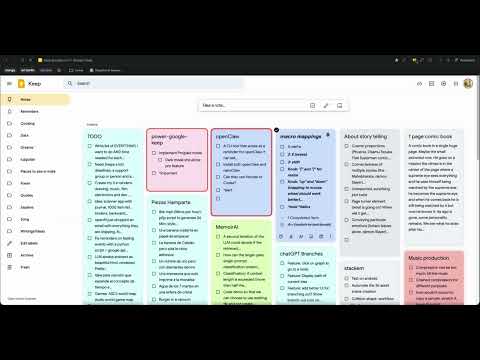
Randomly assigns pleasing colors, themes and features to Google Keep notes with stable mapping, palettes, and optional pro features.
Keep it Colorful transforms Google Keep into a more expressive, easier-to-scan workspace. Automatically apply beautiful color palettes to your notes, keep colors stable per note, and customize the overall look with curated themes, fonts, layout modes, and highlight effects. Features: - Automatic note coloring for Google Keep - Stable per-note color mapping - Multiple palettes and visual styles - Font modifiers and typography options - Manual highlight glow for important notes - Focus mode for distraction-free editing - Layout controls for different browsing styles - Header image support inside notes - Premium themes, fonts, and customization options - Keyword-based effects using *keywords Keyword examples: *important: lets you add red border to notes *focus: lets you see your note with a fully black background *alert: makes your note have a blinking red border
5 out of 51 rating
Details
- Version1.0.2
- UpdatedMarch 17, 2026
- Offered bycamus.00
- Size62.52KiB
- LanguagesEnglish
- Developer
Email
arjuna1@protonmail.com - Non-traderThis developer has not identified itself as a trader. For consumers in the European Union, please note that consumer rights do not apply to contracts between you and this developer.
Privacy

This developer declares that your data is
- Not being sold to third parties, outside of the approved use cases
- Not being used or transferred for purposes that are unrelated to the item's core functionality
- Not being used or transferred to determine creditworthiness or for lending purposes