


Overview
A free toolkit for KDP authors — write, format, and publish your Kindle book. By xBookVideo.
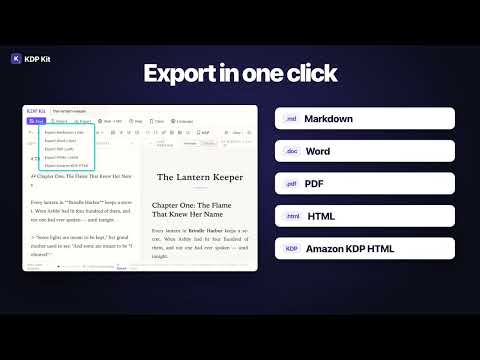
KDP Kit is a free, all-in-one toolkit for self-published authors who use Amazon Kindle Direct Publishing (KDP). It runs entirely in your browser as a Chrome extension — no account, no cloud, no tracking. CORE FEATURES: 📖 Markdown Editor with Auto-Save Write and edit your manuscript in a beautiful, serif-styled Markdown editor with real-time preview. Auto-save keeps your work safe. 📤 Export to 5 Formats One-click export to Markdown (.md), Microsoft Word (.doc), PDF, HTML, and Amazon KDP HTML — ready for upload to Kindle Direct Publishing. 🌐 Web to Markdown Convert the page you're reading with one click — even pages behind a login — or paste a URL. Pages are fetched directly by your browser, never through a third-party server. Perfect for research and compiling reference material. ✨ Select Text Anywhere → Edit Highlight text on any web page and send it straight to KDP Kit via the floating button or right-click context menu. No copy-pasting. Prefer a clean page? The floating button can be turned off. 🌍 10 Languages Interface in English, 简体中文, 繁體中文, 日本語, 한국어, Español, Français, Deutsch, Русский and Português. ⌨️ Shortcut Press Alt+Shift+K (Mac: Option+Shift+K) to open KDP Kit instantly. PERFECT FOR: - Self-published authors writing on KDP - Content creators who compile research from the web - Writers who want a distraction-free Markdown editor - Anyone who needs to convert web pages to clean text 100% FREE. No account required. Your writing never leaves your device — everything is saved and processed locally in your browser. No proxies, no analytics, no tracking. NEW IN 2.0.2 • Web to Markdown: new "Use current page" (works on pages behind a login); URLs are fetched directly by your browser — no third-party proxies • Right-click "Convert page to Markdown" fixed • Floating button can be turned off • New shortcut: Alt+Shift+K Made with ❤️ by xBookVideo.
5 out of 51 rating
Details
- Version2.0.2
- UpdatedNovember 10, 2026
- Size119KiB
- LanguagesEnglish (United States)
- DeveloperWebsite
Email
leealpha12322@gmail.com - Non-traderThis developer has not identified itself as a trader. For consumers in the European Union, please note that consumer rights do not apply to contracts between you and this developer.
Privacy

This developer declares that your data is
- Not being sold to third parties, outside of the approved use cases
- Not being used or transferred for purposes that are unrelated to the item's core functionality
- Not being used or transferred to determine creditworthiness or for lending purposes
Support
For help with questions, suggestions, or problems, visit the developer's support site